EasyManua.ls Logo

TFA 30.5042 - User Manual

TFA 30.5042
32 pages
Go to English
Print Icon
To Next Page IconTo Next Page
Loading...
64
Termómetro-higrómetro digital
Humedad del aire 1 … 99 %rH
Indicación LL / HH Valor medido fuera del rango de
medición
Alimentación de tensión Pila 1,5 V AAA
Dimensiones del cuerpo 90 x 28 x 82 mm
Peso 99 g (solo dispositivo)
TFA Dostmann GmbH & Co.KG, Zum Ottersberg 12, D-97877 Wertheim.
Estas instrucciones o extractos de las mismas no pueden ser publicados sin la
autorización de la TFA Dostmann. Los datos técnicos de este producto correspon-
den al estado en el momento de la impresión y pueden ser modificados sin previo
aviso. Los actuales datos técnicos e informaciones sobre su producto los puede
encontrar bajo el número de artículo en nuestra página web.
www.tfa-dostmann.de 03/19
Bedienungsanleitung
Instruction manual
Mode d’emploi
Instrucciones de uso
Gebruiksaanwijzing
Istruzioni per l'uso
Kat. Nr. 30.5042
RoHS
TFA_No. 30.5042_Anleitung_03_19 20.03.2019 11:58 Uhr Seite 1
Question and Answer IconNeed help?

Do you have a question about the TFA 30.5042 and is the answer not in the manual?

Summary

Before You Use This Product

Safety Guidelines

General Safety Instructions

Follow manual instructions to prevent damage and loss of rights; note safety advice.

Product Usage Restrictions

Use product only as described; unauthorized repairs are prohibited.

Device Components Overview

LCD Display Elements

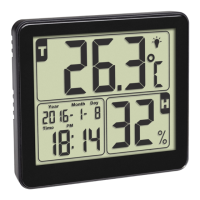
Identifies indoor temperature and humidity readings on the main screen.

Control Buttons

Describes functions of MODE, MAX/MIN, and °C/°F buttons.

Battery Compartment Access

Details the location and access to the battery compartment.

Getting Started

Device Operation

Manual Clock and Calendar Setup

Step-by-step guide to manually set the year, month, day, and time format.

Setting Alarm Time

Instructions for setting the desired alarm time and activating it.

Activate;Deactivate Alarm

How to enable or disable the alarm function using the MODE button.

Temperature Unit Selection

How to switch between Celsius (°C) and Fahrenheit (°F) temperature units.

Viewing Max;Min Readings

How to display and reset the highest and lowest recorded temperature and humidity.

Backlight Functionality

Explains the automatic backlight activation and manual deactivation.

Care and Maintenance

Battery Replacement Guide

When and how to replace the device battery to ensure optimal performance.

Troubleshooting Common Issues

Product Specifications

Waste Disposal Instructions

Summary

Before You Use This Product

Safety Guidelines

General Safety Instructions

Follow manual instructions to prevent damage and loss of rights; note safety advice.

Product Usage Restrictions

Use product only as described; unauthorized repairs are prohibited.

Device Components Overview

LCD Display Elements

Identifies indoor temperature and humidity readings on the main screen.

Control Buttons

Describes functions of MODE, MAX/MIN, and °C/°F buttons.

Battery Compartment Access

Details the location and access to the battery compartment.

Getting Started

Device Operation

Manual Clock and Calendar Setup

Step-by-step guide to manually set the year, month, day, and time format.

Setting Alarm Time

Instructions for setting the desired alarm time and activating it.

Activate;Deactivate Alarm

How to enable or disable the alarm function using the MODE button.

Temperature Unit Selection

How to switch between Celsius (°C) and Fahrenheit (°F) temperature units.

Viewing Max;Min Readings

How to display and reset the highest and lowest recorded temperature and humidity.

Backlight Functionality

Explains the automatic backlight activation and manual deactivation.

Care and Maintenance

Battery Replacement Guide

When and how to replace the device battery to ensure optimal performance.

Troubleshooting Common Issues

Product Specifications

Waste Disposal Instructions

TFA 30.5042 Specifications

General IconGeneral
BrandTFA
Model30.5042
CategoryWeather Station
LanguageEnglish

Related product manuals