EasyManua.ls Logo

TFA 60.4509 - User Manual

TFA 60.4509
20 pages
Go to English
Print Icon
To Next Page IconTo Next Page
Loading...
Bedienungsanleitung
Instruction manual
Mode d’emploi
Istruzioni per l'uso
Gebruiksaanwijzing
Instrucciones de uso
Kat. Nr. 60.4509
Instruction manuals
www.tfa-dostmann.de/en/service/downloads/instruction-manuals
TFA_No. 60.4509_Anleit_02_23 10.02.2023 17:52 Uhr Seite 1
Question and Answer IconNeed help?

Do you have a question about the TFA 60.4509 and is the answer not in the manual?

Summary

Radio Controlled Clock with Temperature

Before You Use This Product

General instructions and important details for initial use and operation of the device.

Delivery Contents

Lists the items included with the radio-controlled clock.

Field of Operation and Benefits

Highlights the product's features, language options, and ideal uses.

Safety Information

Crucial safety precautions, handling of batteries, and product usage warnings.

Device Elements and Buttons

Identifies the LCD display segments and the physical buttons on the device.

Getting Started

Step-by-step guide for initial setup, including battery insertion and DCF signal reception.

Radio-Controlled Time Reception

Operation

General operating instructions, including how to fast run settings.

Manual Clock and Calendar Setting

Guide to manually setting the year, month, day, hour, minute, and day-of-the-week language.

Setting Second Clock Time

Instructions for setting and displaying a second clock time.

Setting Alarm Times

Procedure for setting the first and second alarm times.

Activating and Deactivating Alarms

How to turn alarm functions on and off, and manage the snooze feature.

Temperature Display Settings

How to switch between Celsius and Fahrenheit for temperature display.

Care, Maintenance, and Troubleshooting

Care and Maintenance

Guidelines for cleaning the instrument and proper storage.

Battery Replacement

Steps for replacing batteries when the battery symbol appears.

Positioning and Fixing

Instructions for wall mounting or table standing the device.

Troubleshooting: No Display

Solutions for when the device shows no display.

Troubleshooting: Reception Issues

Steps to resolve issues with no DCF reception or incorrect indications.

Waste Disposal

Instructions for environmentally friendly disposal of the product and batteries.

Product Specifications

Technical details including power, measuring range, and dimensions.
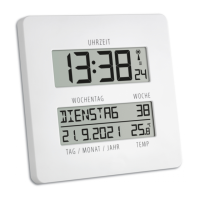
Summary

Radio Controlled Clock with Temperature

Before You Use This Product

General instructions and important details for initial use and operation of the device.

Delivery Contents

Lists the items included with the radio-controlled clock.

Field of Operation and Benefits

Highlights the product's features, language options, and ideal uses.

Safety Information

Crucial safety precautions, handling of batteries, and product usage warnings.

Device Elements and Buttons

Identifies the LCD display segments and the physical buttons on the device.

Getting Started

Step-by-step guide for initial setup, including battery insertion and DCF signal reception.

Radio-Controlled Time Reception

Operation

General operating instructions, including how to fast run settings.

Manual Clock and Calendar Setting

Guide to manually setting the year, month, day, hour, minute, and day-of-the-week language.

Setting Second Clock Time

Instructions for setting and displaying a second clock time.

Setting Alarm Times

Procedure for setting the first and second alarm times.

Activating and Deactivating Alarms

How to turn alarm functions on and off, and manage the snooze feature.

Temperature Display Settings

How to switch between Celsius and Fahrenheit for temperature display.

Care, Maintenance, and Troubleshooting

Care and Maintenance

Guidelines for cleaning the instrument and proper storage.

Battery Replacement

Steps for replacing batteries when the battery symbol appears.

Positioning and Fixing

Instructions for wall mounting or table standing the device.

Troubleshooting: No Display

Solutions for when the device shows no display.

Troubleshooting: Reception Issues

Steps to resolve issues with no DCF reception or incorrect indications.

Waste Disposal

Instructions for environmentally friendly disposal of the product and batteries.

Product Specifications

Technical details including power, measuring range, and dimensions.

TFA 60.4509 Specifications

General IconGeneral
BrandTFA
Model60.4509
CategoryClock
LanguageEnglish

Related product manuals