Need help?
Do you have a question about the TFA HORIZON and is the answer not in the manual?
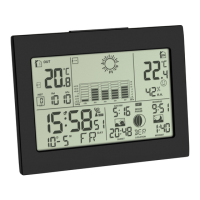
Details the LCD display symbols and their meanings for the base station.
Details the components and functions of the outdoor transmitter unit.
Explains the function of each button on the base station and the transmitter.
Instructions for correctly inserting batteries into the base station and transmitter.
Procedure for setting the current weather forecast symbol on the display.
Details how to establish and troubleshoot the connection for outdoor temperature data.
Explains how the clock automatically receives time signals and manual initiation.
Provides background information on the atomic clock time base and reception quality factors.
Step-by-step guide to configure time zone, date, time, and geographical location.
How to switch between 12-hour and 24-hour time display formats.
Instructions for setting, activating, deactivating, and managing alarm times.
How to select between Celsius and Fahrenheit temperature display units.
Indicates whether the outdoor temperature is increasing, steady, or decreasing.
Displays a smiley icon indicating the comfort level based on temperature and humidity.
How to view and reset the maximum and minimum recorded temperature and humidity values.
Explanation of the 5 weather symbols and 3 pressure trend symbols used for forecasting.
How to select and adjust between absolute and relative atmospheric pressure displays.
Describes the bar graph indication showing atmospheric pressure trends over the last 12 hours.
Calculates and displays sunrise, sunset, moonrise, and moonset times after location setting.
Illustrates the daily moon phases from New Moon to Waning Crescent.
How to select channels for multiple transmitters and switch between them.
Guidance on when and how to replace batteries in the base station and transmitter.
Solutions for when the base station or transmitter shows no display.
Troubleshooting steps for when the outdoor transmitter signal is not received.
Steps to resolve issues with receiving the radio-controlled time signal.
Solutions for when the displayed values are incorrect or inaccurate.
 General
| Model | HORIZON |
|---|---|
| Category | Weather Station |
| Display Type | LCD |
| Wireless Transmission | Yes |
| Transmission frequency | 868 MHz |
| Measurement Parameters | Temperature, Humidity, Air Pressure, Weather Forecast |
| Temperature range (indoor) | 0°C to +50°C |
| Humidity range (indoor) | 20...95% |
| Humidity range (outdoor) | 20...95% |
| Transmission range | 100 m (open field) |
| Power source (outdoor sensor) | 2x AA batteries |
| Brand | TFA Dostmann |

 To Next Page