1716
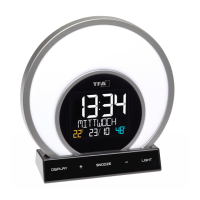
SOLUNA – Wake-up light alarm clock with colour changing mood light and room climate
SOLUNA – Wake-up light alarm clock with colour changing mood light and room climate
8.1.5 Individual colour mode
• You can customize the display colour in this mode.
• You can change to 14 colours by pressing the + or – button several times while the colour is flashing.
9. Care and maintenance
• Clean the device with a soft damp cloth. Do not use solvents or scouring agents.
• Unplug the device if you do not use it for a long period of time.
• Keep the device in a dry place.
10. Troubleshooting
Problem Solution
No display ➜ Connect the device to the power adapter
➜ Check the power adapter
➜ Press the DISPLAY button to adjust the display light.
Incorrect indication ➜ Use a pin to press the RESET button at the back
No charging function ➜ Check the USB port connection
If your device fails to work despite these measures, contact the retailer where you purchased the product.
11. Waste disposal
This product has been manufactured using high-grade materials and components which can be recycled and reused.
This product is labelled in accordance with the EU Waste Electrical and Electronic Equipment Directive (WEEE).
Please do not dispose of this product in ordinary household waste. As a consumer, you are required to take end-of-life devices to a
designated collection point for the disposal of electrical and electronic equipment, in order to ensure environmentally-compatible dis-
posal.
12. Specifications
Power consumption: Power supply (included)
Input: 100-240V AC 50/60Hz 0.5A Max
Output: 5.0 V DC 1.5A, 7.5W
Average active efficiency: ≥76.65%
No-load power consumption: ≤0.10 W
7.4.3 Activate and deactivate the alarm functions
• Press the LIGHT ALARM button or the ALARM button in normal mode, to activate or deactivate the corresponding alarm function. The last adjust-
ed alarm time is indicated and the alarm symbol will appear or disappear on the display.
8. Mood light
• The device has a mood light with 5 light modes with a choice of 20 colours in 5 levels of brightness.
8.1 Light mode selection
• In normal mode, press the LIGHT button to toggle between the following modes: automatic colour change (CYCLE), sunset (EVENING), breathing
mode (BREATHING), colour change according to comfort level of room climate (COMFORT), direct colour selection (PICK COLOR).
• Use the + or – button to select other options within the modes.
• Confirm the setting with the SNOOZE button, press the LIGHT button twice briefly or wait 5 seconds to confirm the setting and return to normal
mode.
• Press the + or – button in normal mode to adjust the brightness in 5 levels or to switch it off (except in EVENING mode).
• To turn off the mood light, press the SNOOZE button.
8.1.1 Automatic colour change
• In this mode the display colour changes automatically in gentle transitions through the colour hues.
8.1.2 Sunset/sleep mode
• This mode allows for a gentle fall asleep with a simulated sunset. The light slowly darkens in several stages within 30 minutes.
8.1.3 Breathing mode
• The breathing mode will walk you through a 10-minute deep breathing exercise. Simply inhale and exhale as the colours change. To further assist
you, the time display counts down the seconds of your inhale and exhale times.
• You can change to 3 different colours by pressing the + or – button: Energy, warmth, calm.
8.1.4 Comfort colour mode
• The display colour adjusts to the humidity in different colour hues.
Colour hues Humidity
Red 1…25%
Orange/yellow 26…39%
Blue/green 40…75%
Blue 76…83%
Lilac 84…99%
TFA_No. 60.2026_Anleitung_05_20 20.05.2020 12:30 Uhr Seite 9


 To Next Page
 Loading...