Need help?
Do you have a question about the TFA TIME BLOCK and is the answer not in the manual?
Provides essential information for familiarizing yourself with the device, its functions, parts, and initial use guidance.
Lists all items included with the digital alarm clock, such as the power adapter, backup battery, and instruction manual.
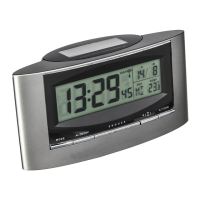
Highlights key features like large LED digits, temperature display, alarm with snooze, date, and IR motion sensor.
Details the intended use, restrictions on modifications, and emphasizes it's for home use only, not medical purposes.
Warns about connecting to a properly regulated socket and preventing contact with water or moisture.
Identifies and lists all physical components and buttons on the device for user interaction and function.
Provides initial setup steps: opening battery compartment, connecting power adapter, and initial display activation.
Explains how to switch between 12-hour (with PM indicator) and 24-hour time formats using the DOWN button.
Guides on setting the current time and date using the FUNCTION, UP, DOWN, and MODE buttons sequentially.
Details the process for setting the alarm time and snooze interval using specific buttons and function switches.
Describes how to enable/disable the alarm and use the snooze feature via motion sensor or SNOOZE button.
Instructions on how to change the temperature unit between Celsius (°C) and Fahrenheit (°F) in normal mode.
How to view temperature, date, alarm time, and snooze interval by interacting with the device in normal mode.
Instructions on adjusting the display brightness to three different levels: HIGH, MIDDLE, and LOW.
Procedure to reset the clock to its initial mode using the RESET button and a pin, if it malfunctions.
Guidance on cleaning the device with a soft damp cloth and keeping it in a dry environment away from moisture.
Details on the backup battery function, correct polarity, and removal for long-term storage.
Provides solutions for common problems like no display indication or incorrect display on the instrument.
Instructions on proper disposal of the product and batteries according to environmental regulations (WEEE).
 General
| Brand | TFA |
|---|---|
| Model | TIME BLOCK |
| Category | Alarm Clock |
| Language | English |

 To Next Page