
 To Next Page
M
Mark WoodsJul 29, 2025
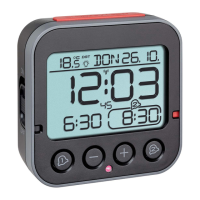
How to fix no display on TFA TIME & LIGHT Alarm Clock?
- RRyan OwensJul 29, 2025
If your TFA Alarm Clock's display is not showing anything, try charging the device using the micro-USB cable included in the package.

How to fix no display on TFA TIME & LIGHT Alarm Clock?
If your TFA Alarm Clock's display is not showing anything, try charging the device using the micro-USB cable included in the package.
What to do if my TFA TIME & LIGHT Alarm Clock indication is incorrect?
If your TFA Alarm Clock is showing incorrect information, use a pin to press the RESET button (Fig.2-B) for 3 seconds.
Why does my TFA TIME & LIGHT make a noise when shaken?
The TFA Alarm Clock has a ball switch inside, so the slight noise when you shake or flip it is normal and not a sign of malfunction. The sound is the ball rolling around.
Why does my TFA TIME & LIGHT Alarm Clock make noise when I shake it?
The TFA Alarm Clock might make a slight noise when shaken or flipped. This is because the device has a ball switch, and the sound is the ball rolling around. This is not a malfunction.
Connect the device via USB cable to a suitable USB power source (5V DC).
Small parts can be swallowed by children. Lithium batteries carry risk of fire or explosion.
Unauthorized repairs are prohibited. Avoid extreme temperatures, vibrations, or shocks. Clean with a damp cloth.
Remove protective film and connect the device via USB cable to a power source.
Charge fully for 3-4 hours. Monitor charging status symbol. Avoid leaving fully charged device connected.
Press and hold TIME SET to enter setting mode. Adjust hours and minutes using +/- buttons.
Press TIME SET button twice to switch between 12 HR and 24 HR systems.
Set alarm times using ALARM buttons. Activate/deactivate alarms. Snooze function activates by shaking.
Backlight adjusts via sensor or button. Brightness controlled by +/- buttons.
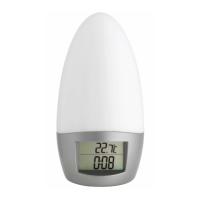
Flip device to activate night light. Adjust brightness with LIGHT button.
Dispose of packaging using designated collection systems for recycling.
Do not dispose of in household waste. Take to designated WEEE collection point.
Batteries contain lithium and pose fire/explosion risk. Pay attention to correct disposal.
 General
| Brand | TFA |
|---|---|
| Model | TIME & LIGHT |
| Category | Alarm Clock |
| Language | English |