12
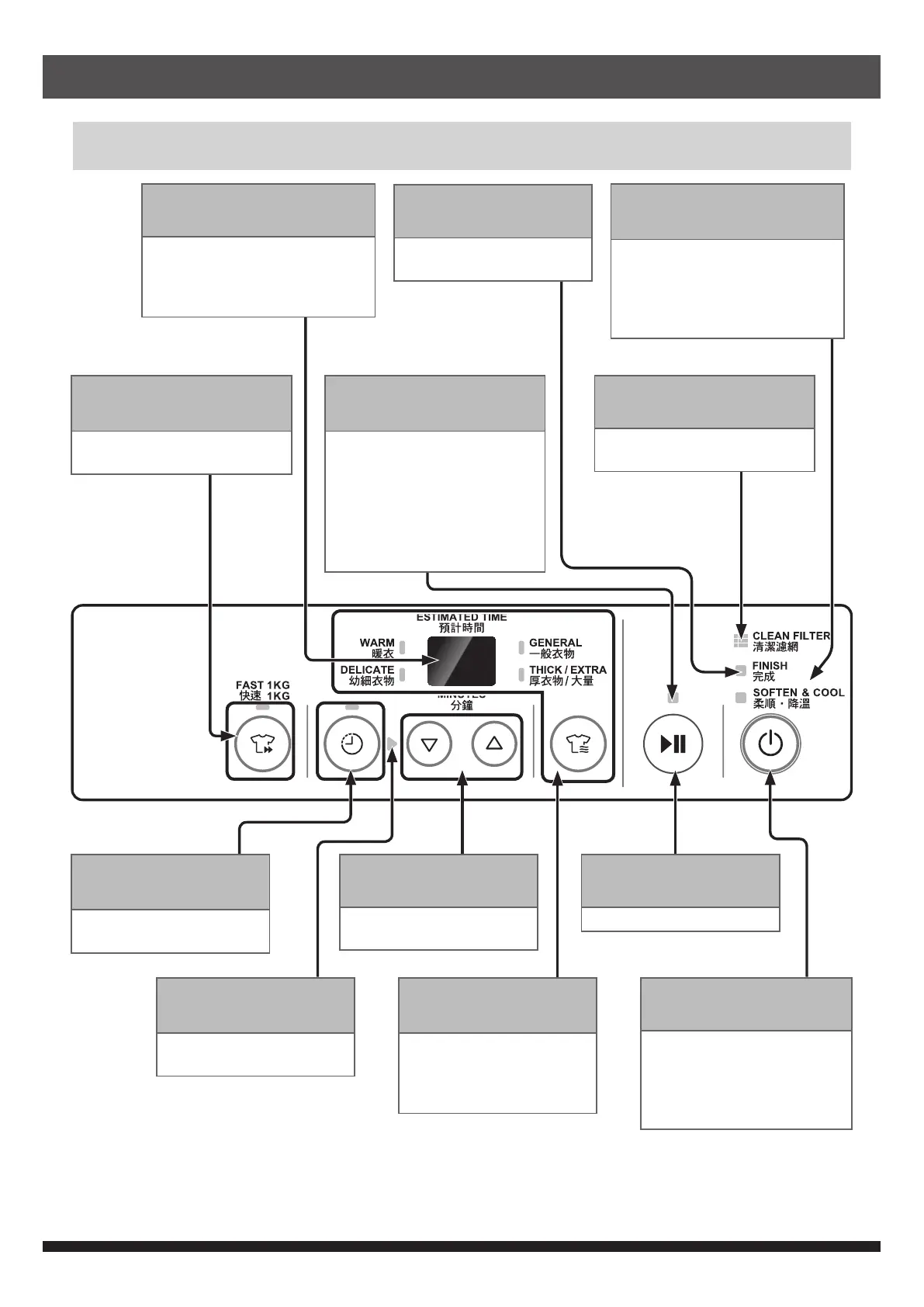
Control Panel
Digital display
• To display estimated
remaining time or time
setting
• To display error code
FAST 1KG button and
lamp (green)
• To choose FAST 1KG
program
TIMER button and
lamp (green)
• To select drying time
manually
SET TIMER lamp
(green)
• It blinks if TIMER button
is pressed
PROGRAM button
and lamp (green)
• To select drying
program
• The program is
switched for each press
ON-OFF button
• To turn on or off the dryer.
• The dryer is automatically
turned off if there is no
operation in 10 minutes
after turning on
START / PAUSE button
• Start or pause operation
OPERATION lamp
(green/red)
Indications :
• (green) Drying program in
operation
• (red) Gas burner in
operation
• (blinking green) Drying
program paused
CLEAN FILTER lamp (red)
• Please clean the lter when
it blinks or lights up (red)
SET TIMER button
• To adjust drying time
manually
FINISH lamp (green)
• To notify the end of
drying
SOFTEN & COOL lamp
(green)
• At the end of drying, it
automatically enters SOFTEN
& COOL mode and the lamp
blinks. The lamp lights up
when the drum rotate
Product Description


 To Next Page