21
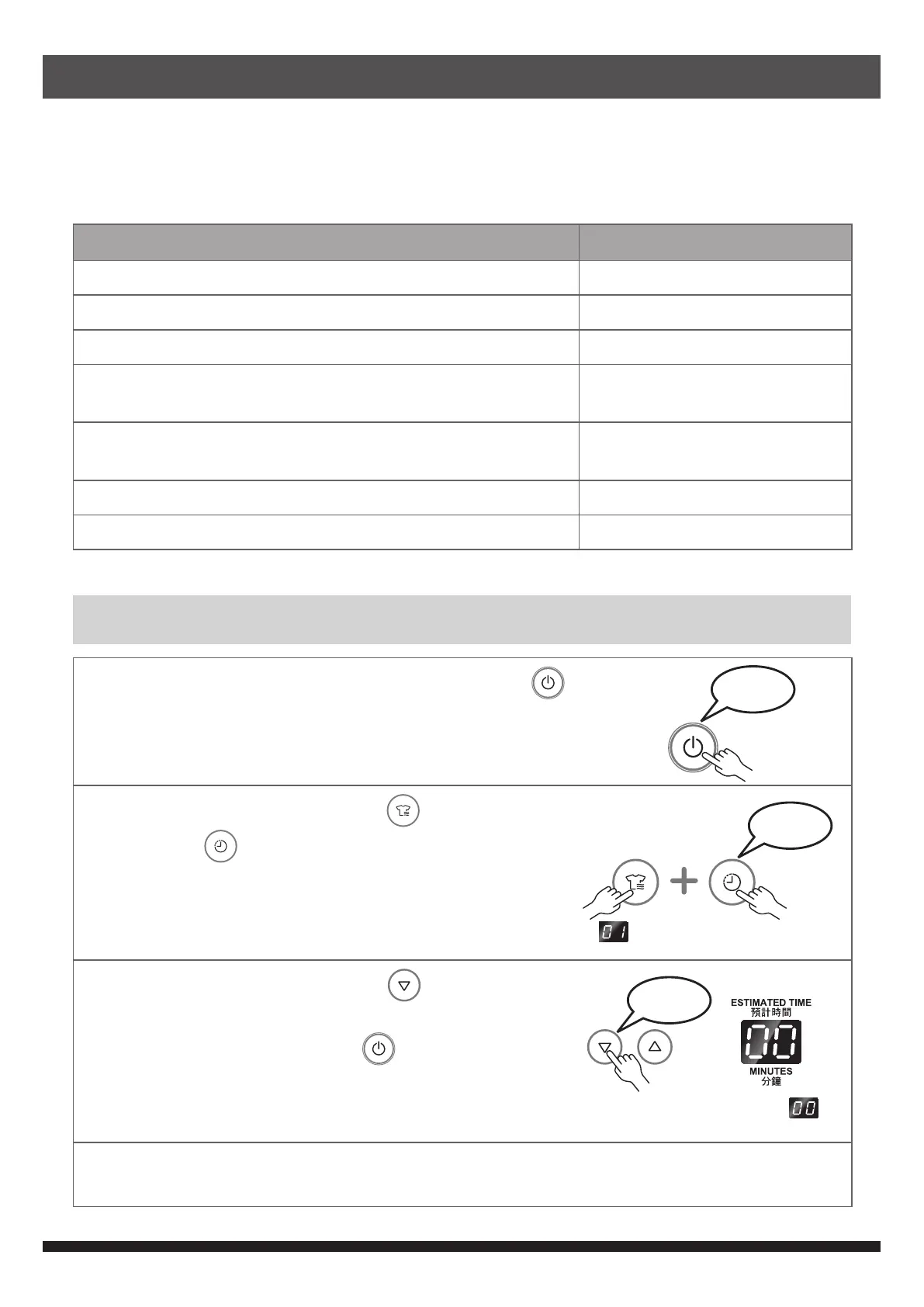
Buzzer Notice
When a button is pressed or the safety device is triggered, the buzzer will sound to
notify the user.
The buzzer is enabled by factory setting. User can disable the buzzer, if required.
Button switch and machine operation state Buzzer sounds
Press button to select function beep
Press button to turn off beep
At the end of drying beep-beep-beep (3 times)
CLEAN FILTER lamp blinks beep-beep, beep-beep, …
(10 times)
Forget to close the door beep-beep, beep-beep, …
(continuous)
The safety device is triggered beep, beep, … (20 times)
Invalid button operation beep-beep
To disable the buzzer
1
Close the door and press the ON-OFF button .
2
Press the PROGRAM button and the TIMER
button
at the same time for 2 seconds. Digital
display shows 01.
is indicated on the display.
beep
3
Press the SET TIMER button to adjust the
digital display to “00”. The buzzer is set as off.
Press the ON-OFF button
to turn off machine.
beep
Set to
To restore buzzer : Repeat step 1 & 2, adjust the digital display to “01”. Then press the ON-
OFF button.
beep


 To Next Page