Ghostly eyes
How would you like to turn your jack-o’-lantern into
something even spookier this Halloween? With your
KosmoDuino, you will be able to give it ghostly eyes.
YOU WILL NEED
› KosmoDuino in the interaction board
› Resistors
› Green LED
› Red LED
› Male-male jumper wires
› Male-female jumper wires
› Breadboard
THE PLAN
Make your jack-o’-lantern’s eyes blink colorfully. On top
of that, you can have it make a gruesome hissing noise at
irregular intervals.
PREPARATION
This time, you will need more than just the interaction
board, because you will have to build a small electronic
circuit. Assemble it out of the parts listed on the left,
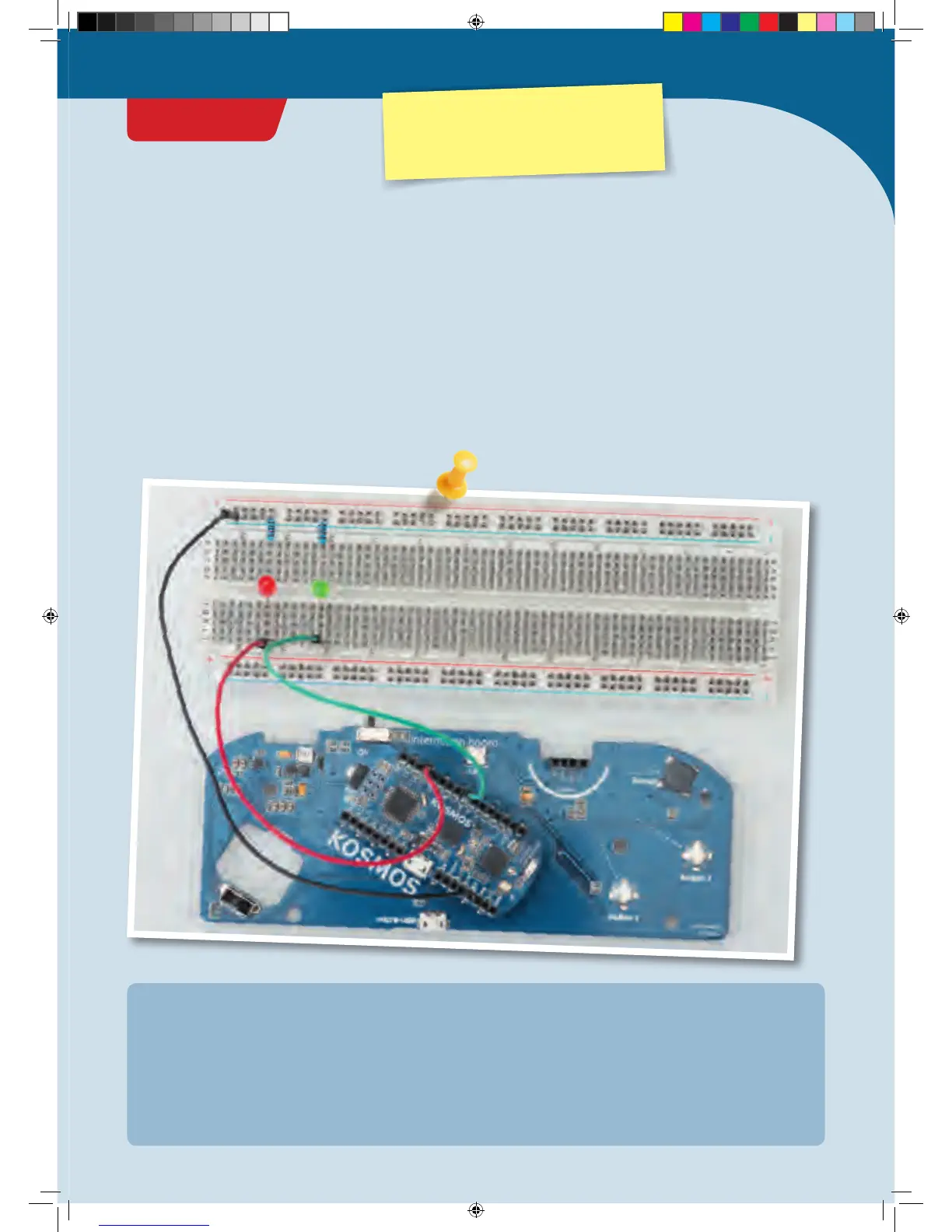
following the illustration.
Be careful to get the polarity of the LEDs correct! They
only work in one direction. Pay attention to the orientation
of their long and short legs.
• One jumper wire connects one GND pin with the
(–) strip of the breadboard.
• One jumper wire connects pin 11 of the KosmoDuino
with hole j 57 of the breadboard.
• One jumper wire connects pin 6 of the KosmoDuino
with hole j 51 of the breadboard.
• The resistors connect the (–) strip and hole a 57 along
with the (–) strip and hole a 51.
• The long leg of the red LED is inserted in hole f 57, the
short one in e 57. Place the short leg of the green LED
in hole f 51 and the long leg in hole e 57.
• To guide the LEDs from the breadboard to the jack-o’-
lantern’s eyes, use the 4 male-female jumper wires to
connect the correspondingly positioned LEDs with the
breadboard.
IN THIS EXAMPLE, THE ASSEMBLY GOES AS FOLLOWS:
CodeGamer
PROJECT 19
Warning! Not suitable for children under 8 years.
There is a risk of hot surfaces of components on the
PCB (printed circuit board) when different polarities
are incorrectly short-circuited or the capacitor is
subject to fault conditions.
CodeGamer manual inside english.indd 55 7/19/16 12:33 PM


 To Next Page