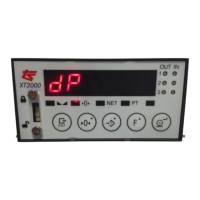
The Thames Side XT1000 is a versatile weighing indicator designed for various industrial applications, offering robust calibration features and user-friendly configuration. It serves as a central control unit for weighing systems, providing accurate weight readings and facilitating system setup and maintenance.
Function Description:
The XT1000's primary function is to accurately measure and display weight from connected load cells. It supports both verified weight calibration (CAL 1) and theoretical calibration (CAL 2) when verified weights are unavailable, making it adaptable to different operational scenarios. The device allows users to define critical scale parameters such as maximum capacity (CAP), division of the scale (d I), decimal point position (dP), automatic zeroing level (0-ErAC), zeroing range (0-tOP), and power-on zeroing behavior (0.StArt). It also enables the selection of weight units (Unit) and displays the input error signal below the minimum range (UndErL). For theoretical calibration, it requires input for the nominal capacity of the load cells (LCAP), the number of load supports (Lno), and the mV/V value of the load cells (LS n).
Important Technical Specifications:
While specific numerical technical specifications like accuracy, resolution, or operating temperature are not explicitly detailed in the provided excerpts, the manual highlights several functional specifications:
- Capacity: Supports a maximum capacity (CAP) up to 100,000 divisions. The note "CAP ÷ d I ≤ 100000" indicates a maximum displayable resolution or internal calculation limit.
- Division (d I): Offers selectable divisions of 1, 2, 5, 10, 20, or 50. It also supports decimal places (dP) for divisions smaller than 1.
- Automatic Zeroing (0-ErAC): Default setting is 0.5d (0.5 divisions), indicating a small band around zero for automatic zeroing.
- Zeroing Range (0-tOP): Default setting is 1.9, defining the range within which the scale can be manually zeroed.
- Power-On Zeroing (0.StArt): Can be set to "oFF" (default, recommended for silos/tanks/hoppers) or "on" (recommended for platform scales).
- Units (Un it): Supports Kilogram (kg), Ton (t), Gram (g), Pound (lb), Ounce (oz), and "none".
- Load Cell Input: Requires input for nominal capacity (LCAP), number of load supports (Lno), and mV/V value (LS n) for theoretical calibration.
Usage Features:
The XT1000 is designed for intuitive use through its keypad and display.
- Navigation and Input: The "F" (up key) is used to change numerical values, while the "◄" (left) and "►" (right) keys are used to move between positions during data entry. The "G" (enter) key is used to confirm selections and store values. The "G" (exit) key is used to exit configuration levels.
- Configuration Access: Access to the configuration level is secured by a factory access code (2802). Once entered, the display briefly shows "UnPro" to confirm unprotected mode, allowing parameter alteration.
- Calibration Procedures:
- Verified Calibration (CAL 1): Involves placing known weights on the scale. The process guides the user through setting the zero point ("0Ero") and then applying a verified weight for span adjustment ("SPAn"). The instrument flashes "-CAL 1-" to confirm storage of zero and span values.
- Theoretical Calibration (CAL 2): Used when verified weights are unavailable. This method requires inputting load cell specifications such as nominal capacity (LCAP), number of load supports (Lno), and mV/V value (LS n).
- Parameter Definition Flow: The manual outlines a clear sequence for defining scale parameters:
- CAP (Capacity): Input the maximum capacity of the scale.
- d I (Division): Select the scale's division.
- dP (Decimal Place): Set the decimal point position.
- 0-ErAC (Automatic Zeroing Level): Define the level for automatic zeroing.
- 0-tOP (Zeroing Range): Set the range for manual zeroing.
- 0.StArt (Power-On Zeroing): Configure power-on zeroing behavior.
- UndErL (Underload Indication): Define the point at which the input error signal is indicated below the minimum range.
- Un it (Unit of Weight): Select the desired unit of weight.
- Display Feedback: The display provides clear feedback during configuration, showing current parameter names (e.g., "CAP", "d I", "UnPro") and flashing indicators (e.g., "-CAL 1-") to confirm actions.
Maintenance Features:
The manual implicitly suggests certain maintenance aspects through its calibration procedures:
- Initial Setup/Warm-up: For first-time use, it's advisable to leave the XT1000 on for 30 minutes prior to calibration to ensure stability.
- Calibration Requirement: Regular calibration (either verified or theoretical) is a key maintenance activity to ensure the accuracy of the weighing system. The manual emphasizes ensuring no unwanted weight is on the system during calibration.
- Configuration Level Exit: Exiting the configuration level completely finalizes the settings. Re-entry requires the factory access code, acting as a safeguard against accidental changes.
- Error Indicators: The device provides error messages like "ErrCAP" and "Errd I" to indicate issues with capacity or division settings, aiding in troubleshooting.

 Need help?
 General

 To Next Page