XT2000 Quick Start Guide
Page 3 of 8
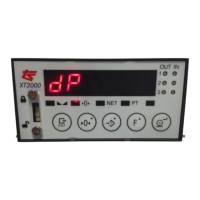
Press to move to dP, which is the position of the decimal point that
you require in relation to the capacity of the scale, (for example in a
3000KG scale you may only require 1KG intervals so 0 decimal places)
Press and choose your dP using the or keys.
Once you have made your choice press to store this value and get
back to dP.
Press to see 0-trAC, which is the level at which the system is
automatically zeroed as long as the weight is within the selected band
and it is stable.
Press to choose your required value using the and keys.
The default setting is 0. 5d. Press to store this value and get back
to 0-trAC.
Press to see 0-toP, which is the range within which the scale may
be zeroed.
Press to choose your required value, the default setting is 1. 9 but
can be altered if required using the or key.
Press to store this value and get back to 0-toP.
Press to see 0.StArt, which zeroes the indicator when it is turned
on. Press and using the or keys choose either oFF (which
is the default setting recommended for silos/tanks and hoppers), or
change to on (recommended for platform scales)
Press to confirm and go back to 0.StArt.


 To Next Page
