Need help?
Do you have a question about the The GigRig Wetter Box and is the answer not in the manual?
Independent gain controls balance effect levels and act as master volume.
Blends between Loop A and Loop B, allowing direct signal to take over.
Procedure to set gain levels for blending two pedals, ensuring bypassed level match.
Explains the operational modes of the Wetter Box for blending effects.
Details connecting an expression pedal for real-time blend control.
Describes how to control the Wetter Box remotely with a latching switch.
Explains how to use the Wetter Box with stereo pedals and signal paths.
Details how to switch the Wetter Box between Mono and Stereo operation.
Procedure to change the bypass state between True Bypass and Trails Mode.
Example setup for achieving delay trails in a mono configuration.
Provides guidance on power supply requirements and options for the Wetter Box.
Details legal disclaimers and limitations of liability for product use.
Lists electrical and performance specifications of the Wetter Box.
The TheGigRig™ Wetter Box is a versatile effects pedal designed to integrate and blend various audio effects in a parallel signal path, offering guitarists and musicians a powerful tool for creative sound shaping. Unlike traditional series connections where effects are chained one after another, the Wetter Box splits the input signal into two separate paths, allowing effects to be processed independently and then mixed back together before the output. This parallel processing capability is a core feature, enabling users to achieve unique sonic textures that might be difficult or impossible with a conventional series setup.
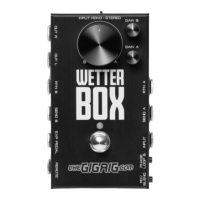
At its heart, the Wetter Box provides two independent effects loops, labeled LOOP A and LOOP B. Each loop can accommodate an effects pedal, and the device offers extensive control over how these loops interact with the original signal and with each other. The primary control for blending these loops is the MIX/BLEND CONTROL dial. This dial allows for seamless transitions between the signals from LOOP A and LOOP B. In "BLEND" mode, the control acts as a crossfader, gradually increasing the presence of one loop while decreasing the other. In "MIX" mode, LOOP B is added on top of LOOP A, which is particularly useful for pedals with "Kill Dry" or 100% wet features, allowing for layering effects without reducing the dry signal of the first loop.
The Wetter Box supports both mono and stereo operation, making it adaptable to various setups. For mono input, a standard instrument cable is used, and the output is typically taken from the left output. For stereo operation, a TRS cable is required for the main input, and the device can process stereo signals throughout its loops, outputting a stereo signal. This stereo capability extends to the gain controls, ensuring that stereo imaging is maintained and controlled effectively. When using stereo effects, TRS to Dual Mono connectors are employed to split and combine the stereo signals within the loops.
A significant feature of the Wetter Box is its independent GAIN CONTROLS for each loop. These controls are positioned after the loop return, acting as master volumes for the signals coming out of LOOP A and LOOP B. This allows users to precisely balance the levels of their effects, ensuring that no single effect overpowers another or the direct signal. These gain circuits remain active even if no pedal is plugged into a loop, which means an empty loop can still be used to manage the level of the direct signal.
The device also includes an OPTOKICK FOOTSWITCH, which serves to engage or disengage the Wetter Box itself. This footswitch is central to its operation, allowing users to easily toggle the parallel effects on or off. For remote control, a REMOTE SWITCH INPUT is provided, enabling the Wetter Box to be controlled by any latching footswitch, which is particularly convenient when the unit is placed in an amp's FX loop.
Another powerful control option is the EXPRESSION PEDAL INPUT. By connecting an expression pedal, users can dynamically control the MIX/BLEND CONTROL in real-time. This opens up possibilities for expressive and evolving soundscapes, allowing for continuous blending of effects with foot control. The Wetter Box is compatible with most commercially available expression pedals with a pot value between 10K and 100K.
The Wetter Box offers two bypass states: True Bypass and Trails Mode. True Bypass is the default, indicated by a blue LED, where all circuitry is bypassed, preserving the original signal integrity. Trails Mode, indicated by a red LED, is exclusive to LOOP B and allows delay or reverb effects to "spill over" into bypass mode. This means that when the Wetter Box is disengaged, the repeats or decay of the effect in LOOP B will continue to fade out naturally, rather than cutting off abruptly. This feature is particularly effective when LOOP A is left empty to carry the direct signal, and a delay pedal is placed in LOOP B. Switching between these modes involves a specific power-up sequence with the footswitch.
Connecting the Wetter Box to an amplifier's FX loop is a common use case, allowing users to blend effects with their amp's pre-amp tone. For optimal results in this setup, using a delay pedal with a 100% wet effect (Kill Dry) is recommended, mixing it on top of the pre-amp signal.
The Wetter Box can also be integrated into more complex pedalboard setups, such as with TheGigRig G2 or Quartermaster switching systems. In such configurations, the Wetter Box itself acts as an effects pedal within a loop of the switcher. This allows users to activate the Wetter Box and its parallel effects as part of a preset, blending different delays or reverbs seamlessly. The remote switch input can further enhance this integration, allowing the G2 to control the Wetter Box's on/off state.
Maintenance of the Wetter Box primarily involves ensuring proper power supply and handling. The device requires a 9V DC power supply with a 2.1mm center-negative connector, capable of delivering 185mA. If using TheGigRig Modular Power Supply, the Wetter Box can be powered directly from a Distributor, as its internal isolation eliminates the need for a high-current adapter. Beyond power, the robust construction of the pedal is designed for durability in live and studio environments. Regular cleaning of connectors and ensuring secure cable connections will help maintain optimal performance. The user manual provides clear instructions for switching bypass modes and setting up various signal chains, which are crucial for proper operation and troubleshooting. The device is designed to be user-friendly, with intuitive controls that make it accessible for both beginners and experienced musicians.
 Power
Power| supply voltage | 9V DC |
|---|---|
| max current | 185mA |
 Input Specifications
| input impedance (true bypass) | Source impedance |
|---|---|
| max input level (true bypass) | Source maximum |
| input impedance (buffered/trails bypass) | 1MΩ |
| max input level (buffered/trails bypass) | +/- 8.5V |
Output Specifications| output impedance (true bypass) | Source impedance |
|---|---|
| max output level (true bypass) | Source Level |
| gain (true bypass) | 0dB(V) |
| bandwidth (bypass – trails mode) | 10Hz – 85KHz |
| output impedance (bypass – trails mode) | 27Ω |
| noise (bypass – trails mode) | 3nV/√Hz |
| max output level (bypass – trails mode) | +/- 8.5V |
| gain (bypass – trails mode) | +6dB(V) |

 To Next Page