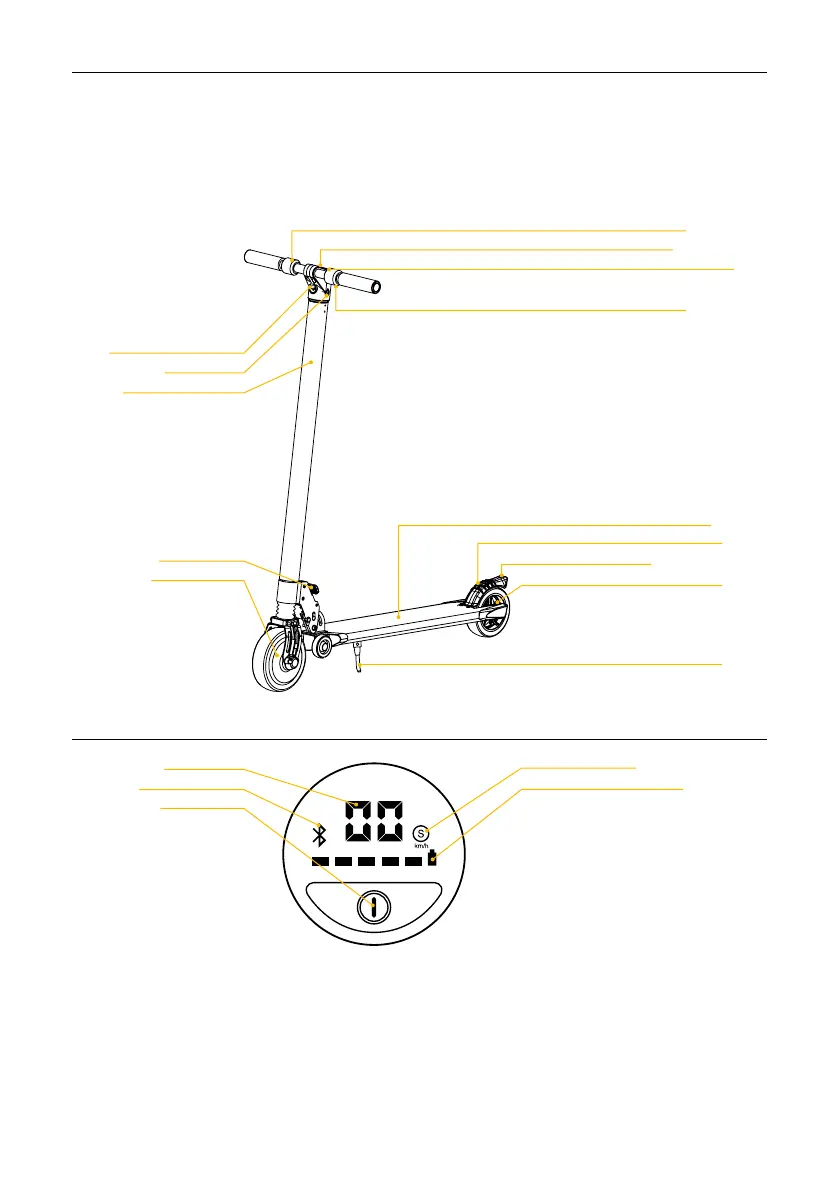
2. Product overview
Control panel
Using the control panel
1. The capacity and speed of the battery are displayed instantly according to the state of travel.
2. Short press (0) to turn on the scooter, long press (3 seconds) to turn off.
3. After turning on the scooter, press briefly (0) to turn on the front light and press briefly again (0) to turn it
off.
4. After switching on the scooter, press briefly (0) twice to change gears:
without “S” means low speed mode,
with “S” means medium speed mode,
with “S” red means high speed mode.
5. You can control the scooter with APP after connecting it with the Bluetooth device.
Light
Charging port
Battery
compartment
Folding lever
Hub engine
Speedometer
Bluetooth
Power button
(multi-function)
Flatbed
Stops
Brake light (stop)
Brake
Easel
Mode / Driving gear
Battery level
Accelerator
Control panel
Bell
Brake lever


 To Next Page