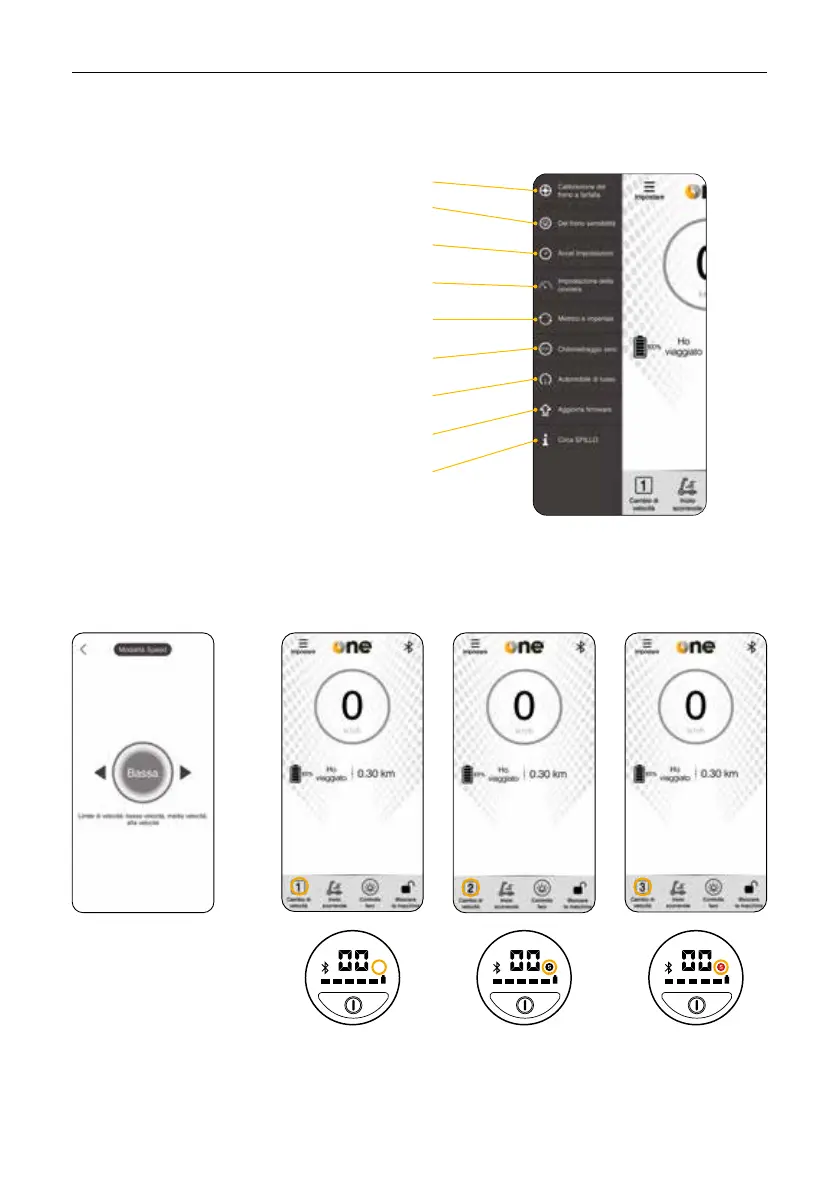
1. Setting
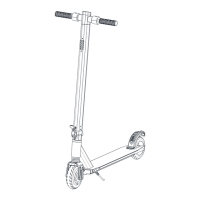
2. Speed mode
- Throttle brake calibration
- Braking sensitivity
allows you to adjust the brake force from 0 to 255
- Acceleration settings:
allows you to adjust the acceleration from 0 to 255
- Cruise setting:
allows you to activate / deactivate the speed lock
- Metric and imperial:
allows you to change the speed unit from Km to Miles
- Clear mileage:
allows you to reset the mileage
- Car status:
info on the status of the scooter
- Update firmware:
check for updates
- About SPILLO:
info about the app
The speed can be
changed between: low
speed, medium speed
and high speed.
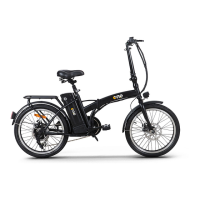
The number 1 will
appear on the App on
“Change Speed”.
Nothing will appear on
the display.
The number 2 will
appear on the App on
“Speed Change”.
An “S” icon will
appear on the display.
The number 3 will
appear on the App on
“Speed Change”.
A red “S” icon will
appear on the display.


 To Next Page