— E10 —
Operation
Playing a CD (Continued)
9
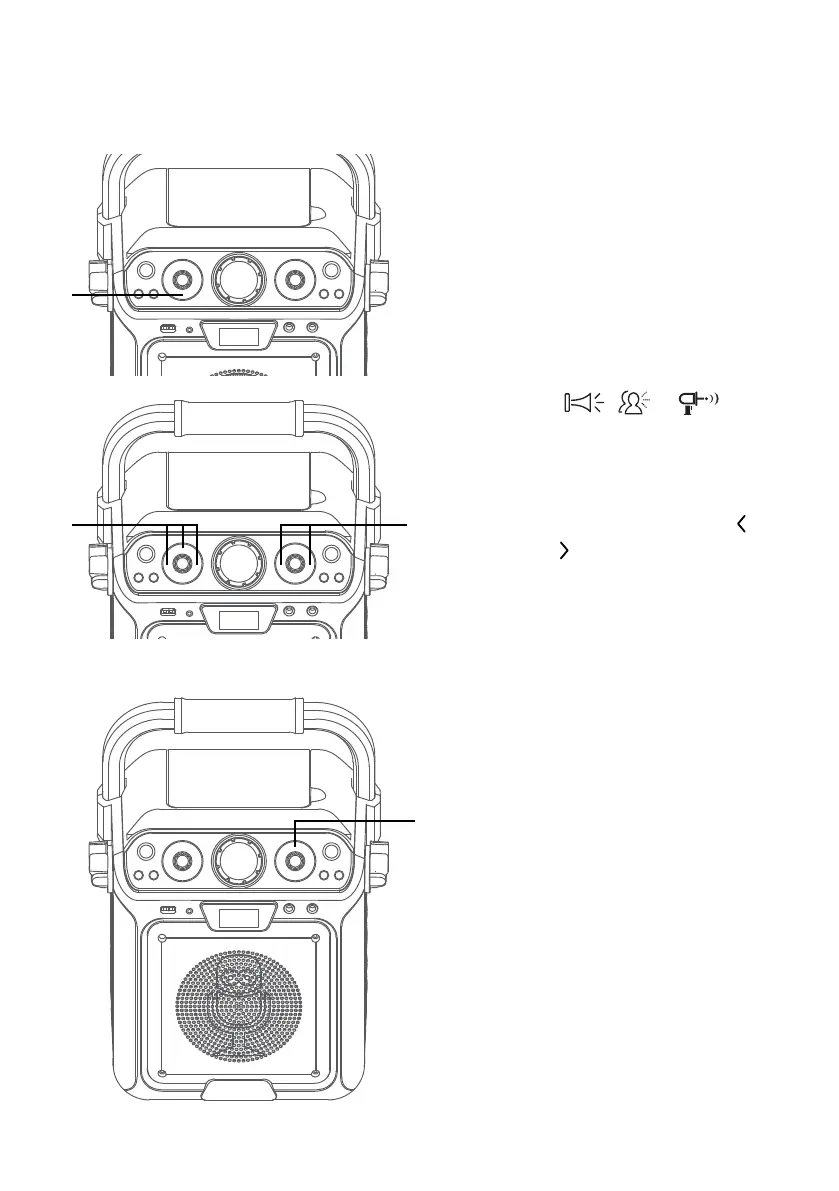
SING-ALONG WITH BUILT-IN
LOOP SONGS
There are 3 built-in looped songs.
To select a song, press SONGS
button repeatedly. To end song
playback, cycle through all songs
and music will stop.
10
PLAYING BUILT-IN EFFECTS
Press , or button
to play three different built-in
sound effects.
11
SKIP: Advance or go back one
track by pressing the Skip
and
Skip
button.
12
REPEAT: During playback, press
the PROG /REPEAT button once
to repeatedly play the selected
song; the Repeat indicator
will blink. Press the PROG /
REPEAT button a second time to
repeatedly play the whole CD; the
Repeat indicator will light solid.
Press it again to cancel Repeat
function, the Repeat indicator
turns off.
13
PROGRAM: You can program
up to 20 tracks on any disc for
playback in any desired order.
While in the Stop mode, press
the PROG /REPEAT button; the
Repeat/Program indicator will
blink and “P01” will appear on
the display indicating the first
program is ready to program.
at
ak
al
am
X














 To Next Page