
 Need help?
Do you have a question about the The Singing Machine SML388W and is the answer not in the manual?
Product safety regarding fire, shock, moisture, ventilation, and handling.
Information on Class 1 Laser product classification and FCC regulatory compliance.
Essential guidelines for safe operation and maintenance of the device.
Specific guidelines for handling and using batteries in the wireless microphone.
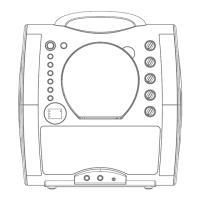
Identifies and describes controls and indicators on the front of the unit.
Details the ports and connections available on the side and rear of the unit.
Instructions for connecting the unit to a power source using the AC adapter.
Guide on connecting the Singing Machine to a television for displaying lyrics.
Connecting external audio devices and adjusting master volume.
Steps for turning the unit on and off using the designated button.
Instructions for playing discs and USB flash drives.
How to switch between different input functions like CD, USB, and Line In.
How to start, pause, stop, and resume playback of audio tracks.
Methods for navigating between tracks and searching within audio.
Adjusting volume, setting repeat modes, and creating programmed playback sequences.
How to connect and adjust microphone volume for singing.
Features for muting vocals, balancing audio, and adjusting key/echo.
Information on activating and using the unit's disco light feature.
Steps to purchase, download, and transfer MP3+G karaoke music files.
Tips for preparing and using USB flash drives with karaoke files.
Answers to common questions regarding file formats for karaoke music.
Solutions for common problems related to power and audio output.
Troubleshooting steps for CD player issues and audio routing problems.
Solutions for problems where lyrics are not displayed correctly on the television screen.
Resolving microphone issues and playback interruptions or speed problems.
Technical details on audio output, CD player, and USB compatibility.
Specifications for input jacks, microphone, and power requirements.
Physical size and weight specifications of the unit.
 General
| Brand | The Singing Machine |
|---|---|
| Model | SML388W |
| Category | Karaoke System |
| Language | English |










 To Next Page