— E5 —
Connection
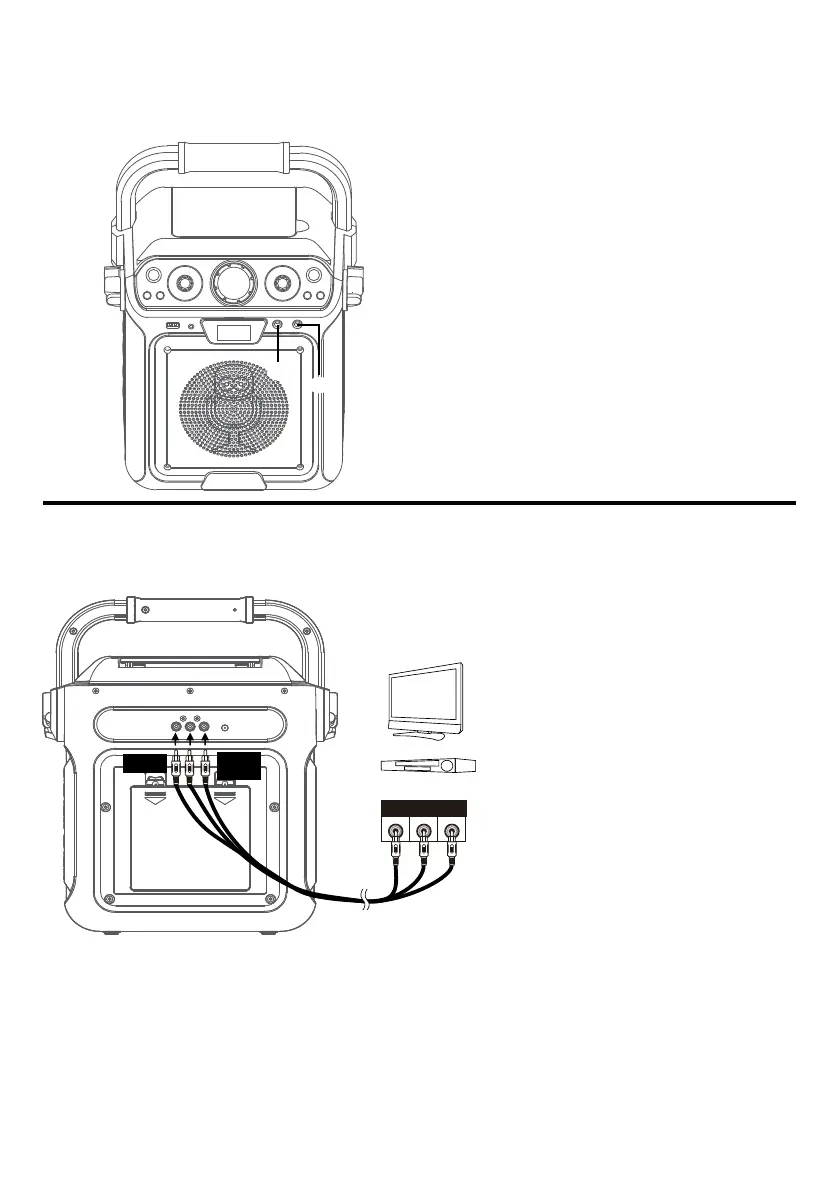
Connecting the Microphone(s)
Microphones:
Connect a microphone into MIC jack 1 u
as well as MIC jack 2 v (when desired).
Note: Do not drop or tap the Mic as
damage to the Mic or speakers may occur.
Do not twirl the microphone by cord as it
will cause damage to the encased wiring.
Connecting the Unit to a TV
To output the video, lyrics and
audio to your TV, perform the
following steps:
1
Connect the RCA video cable
(Yellow) to the VIDEO OUT
jack and the audio cables
(White and Red) to the AUDIO
OUT jacks located on the back
of the Singing Machine.
2
Connect the opposite end of
the RCA video cable (Yellow)
to the VIDEO IN jack and the
audio cables (White and Red)
to the AUDIO IN on your TV.
Notes:
• This unit can be used with or without a TV, but it is highly recommended to use a TV in
order to utilize all the features.
• Also refer to the TV’s User Guide.
• To see the lyrics on the screen, you must use a CD+G disc or MP3+G files.
VIDEO
INP UT
AUDIO
INP UT
RL
RCA cables
VIDEO OUT
(yellow)
AUDIO OUT
(white - L
red - R)
REAR VIEW OF TV
u
v














 To Next Page