AUDIO
OUT
AUDIO
IN
VIDEO
IN
R
L
VIDEO
OUT
R
L
CAMERA
OUT
MAKING THE CONNECTIONS
E8
ENGLISHENGLISH
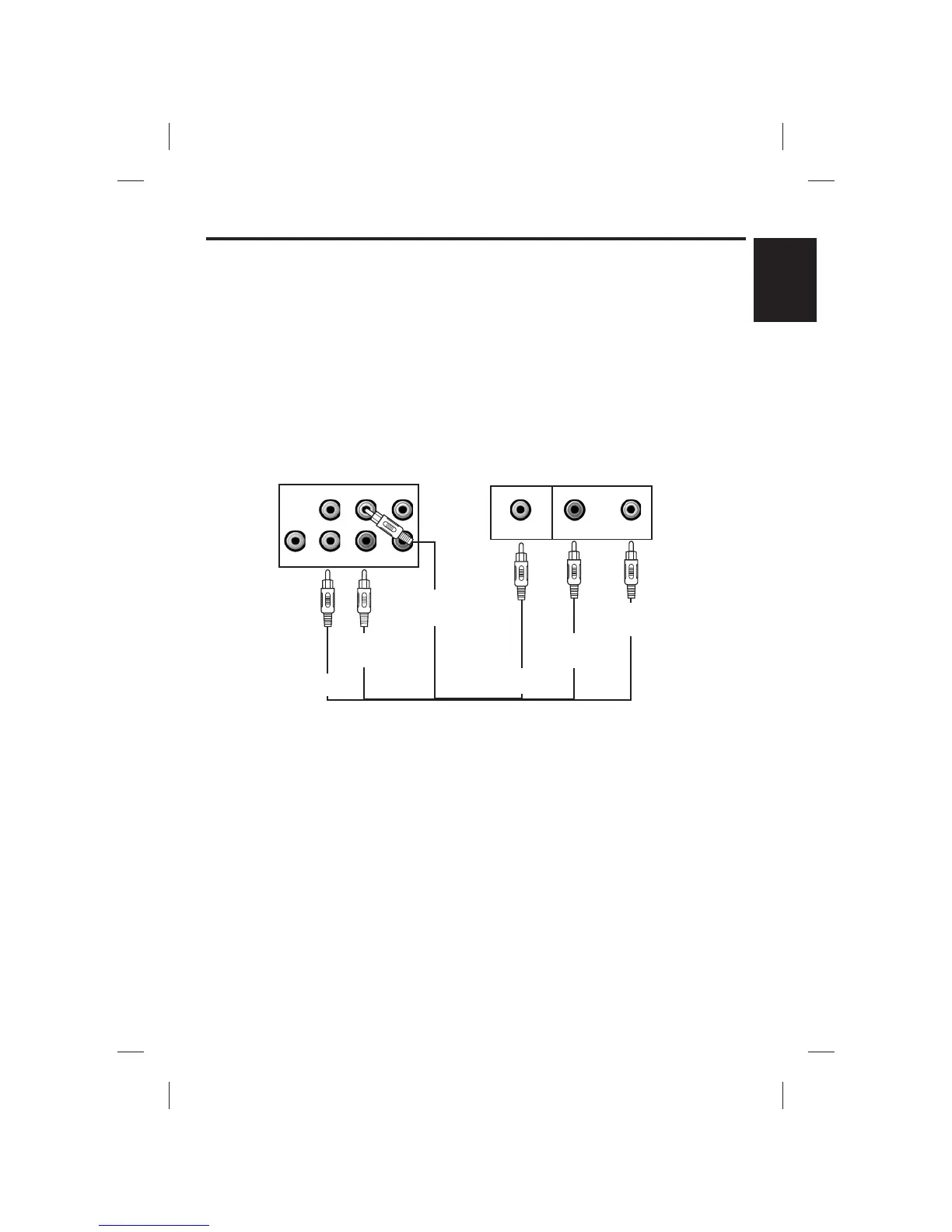
REAR VIEW OF VCR
R
L
VIDEO IN
AUDIO IN
REAR VIEW OF
SINGING MACHINE
VIDEO OUT
(Yellow Jack)
VIDEO IN
(Yellow Jack)
AUX IN
(Red Jack)
AUX OUT
(white Jack)
AUDIO OUT
L
(White Jack)
AUDIO IN
L
(White Jack)
AUDIO IN
R
(Red Jack)
AUDIO OUT
R
(Red Jack)
VIDEO CONNECTION (for VCR recording)
(4) Plug the white end of the patch cord into the whiteAUDIO OUT jack on the unit.
(5) Plug the red end of the patch cord into the redAUDIO OUT jack on unit.
(6) Now connect the other end of the cable’s white (left channel) and red (right channel) plugs
to your VCR ‘AUDIO IN’or ‘AUX IN’jacks.
Please follow the steps below to record CDG lyrics or image on the VCR:
(1) Locate the multicolored patch cords.
(2) Connect Video Cable (yellow) to the Video Out of the back of the Singing Machine.
(3) Connect the other end of the Video Cable (yellow) to the Video Input on your
VCR.









 To Next Page