4
1. Product Introduction
1.1 Product Overview
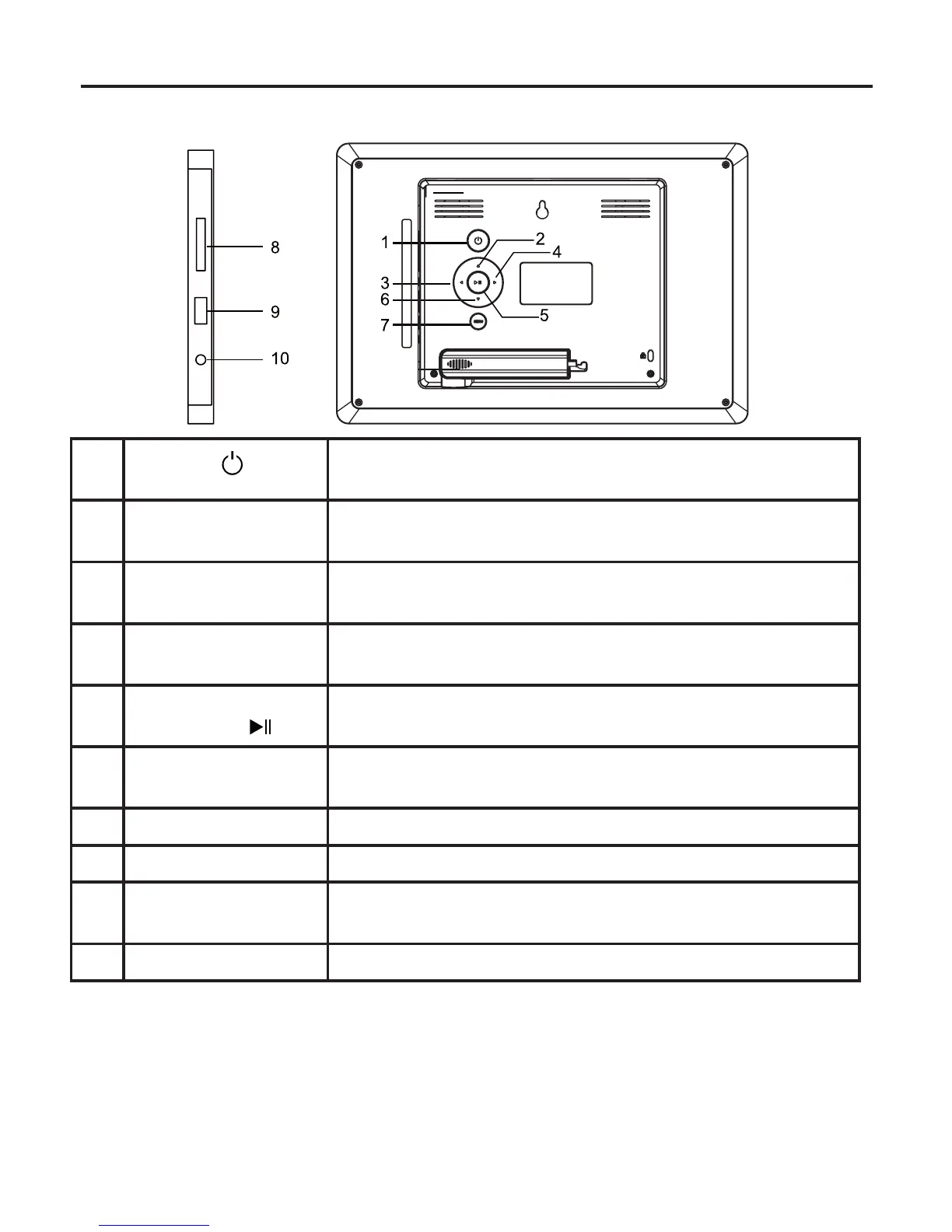
1 POWER
EXIT
•PressandholdtopowerON/OFF
•Toreturntothemainmenu
2 UP
ROTATE
•Tomoveupinthemenu/thumbnail/optionsettings
•Torotatetheimagecounter-clockwise
3 RIGHT
NEXT
•Tomoverightinthemenu/thumbnail/optionsettings
•Todisplaythenextphoto
4 LEFT
PREV
•Tomoveleftinthemenu/thumbnail/optionsettings
•Todisplaythepreviousphoto
5 ENTER
PLAY/PAUSE
•Toconrmasettingorfunction
•Tostart/pausetheslideshow
6 DOWN
ROTATE
•Tomovedowninthemenu/thumbnail/optionsettings
•Torotatetheimageclockwise
7 MENU/SETUP •Toenterthesetupmenu
8 MemoryCardSlot •ToaccommodateSD,SDHC,MMCcards
9 USBInputjack •ToaccommodateUSBdevicessuchasportableUSBash
drivesorashmemorycardreaders
10 PowerInputJack •Toconnecttothemainpoweradapter
1.2 WHAT’S IN THE BOX
•ACAdapter •USBChargingCable
•PictureFrame •RemoteControl
•Owner’sManual



 To Next Page