21
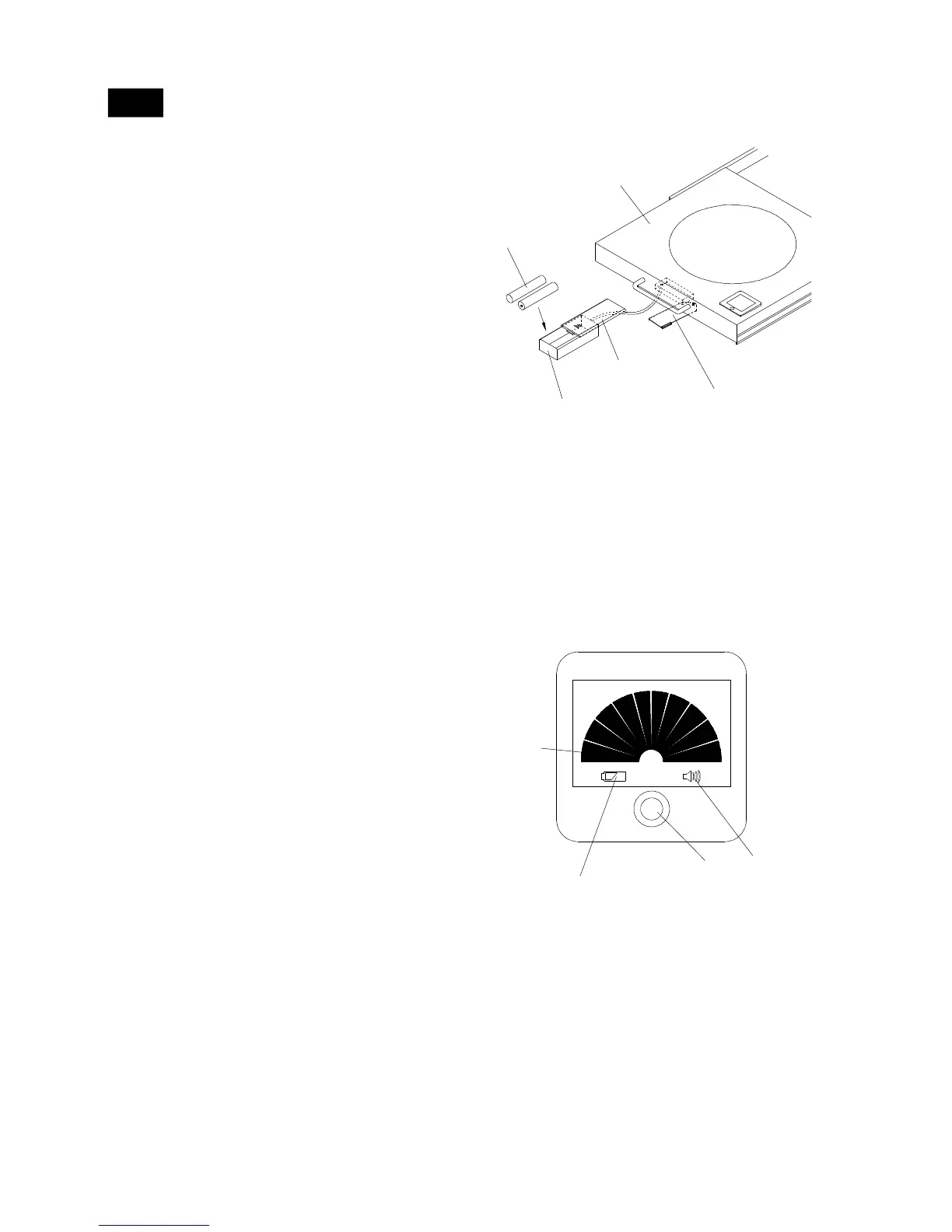
Figure 1a
IMPORTANT: When the gas tank is removed from
the tank tray, the fuel gauge display will not oper-
ate.
Figure 1b
Calibration Procedure:
2.
3.
4.
1.
Before installing batteries be sure the gas tank
is not mounted in the Tank Tray.
Pull out the Tank Tray. Rotate the Battery Box
Retainer on the bottom of Tank Tray. See Figure
1a.
Carefully remove the battery box from the bot-
tom of Tank Tray. Push the Battery Cover and
insert two "AAA" batteries (provided). Be sure
to follow correct polarity when inserting batter-
ies. Return the Battery Cover to position.
Rotate the Battery Box Retainer back into place.
During calibration the Fuel Gauge Display shows
the tank images of FULL and then EMPTY
quickly.
5.
Fuel Gauge Display Operating - See Figure 1b
The Fuel Gauge Display lasts for approximately 20
seconds each time you press the “CHECK” button.
After 20 seconds, the Fuel Gauge Display turns off
automatically. If you press the button a second time
within 20 seconds, the Fuel Gauge Display will be
turned off manually. If you press the button a third
time after 20 seconds, the Fuel Gauge Display will
work and last for another 20 seconds.
The Fuel Gauge Display works only with a tank on
the Tank Tray. No readout will appear if a tank is not
mounted on the Tank Tray.
1.
2.
Press the “CHECK” button to operate Fuel Gauge Dis-
play with the gas tank mounted in the Tank Tray.
NOTES:
Operating Fuel Gauge
10
BATTERY
BOX
AAA BATTERY
BATTERY
COVER
TANK PULL-OUT TRAY
BATTERY BOX
RETAINER
F
ECHCK
LUED INAICTOR
E
F
BATTERY
WARNING
DISPLAY
FUEL
DISPLAY
FUEL
WARNING
DISPLAY
CHECK
BUTTON
NOTE: Tank must be positioned in tray for Fuel
Gauge Display check
Fuel Display: Indicates gas tank fill level.
Fuel Warning Display: When the gas tank fill level
is on the last row, a warning signal will sound for
approximately 3 seconds to warn you that the tank
volume is near empty.
Battery Warning Display: A low battery warning
light will illuminate when the battery voltage drops to
a low level. Replace the batteries.
3.
1.
2.



 To Next Page