Creating a playlist
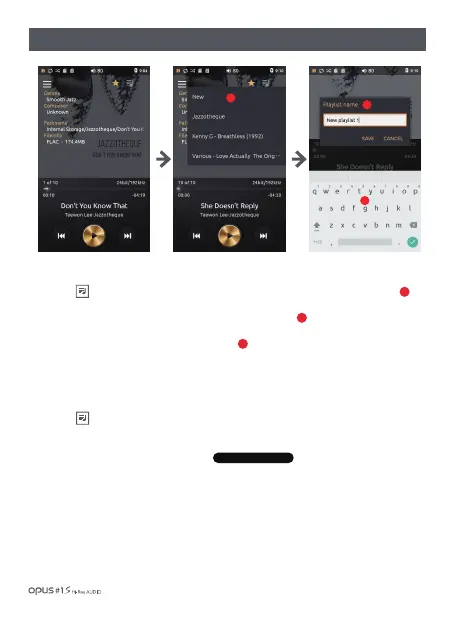
1. Choose icon in File information screen for pop-up window to appear and press “New’ to create playlist.
2. English keyboard will pop up to enter a new name for the playlist.
3. Enter a name for the playlist and then press ‘Save’.
1. Choose icon in File information screen for pop-up window to appear and choose playlist.
Add current song to a playlist.
2. When current song is added to the playlist, message appears.
Adding a song to a playlist
1
2
3
| Music library ‘Playlists’ Creating / Adding Songs
1
3
2
1 song added to playlist 1
Using the device / 20


 To Next Page