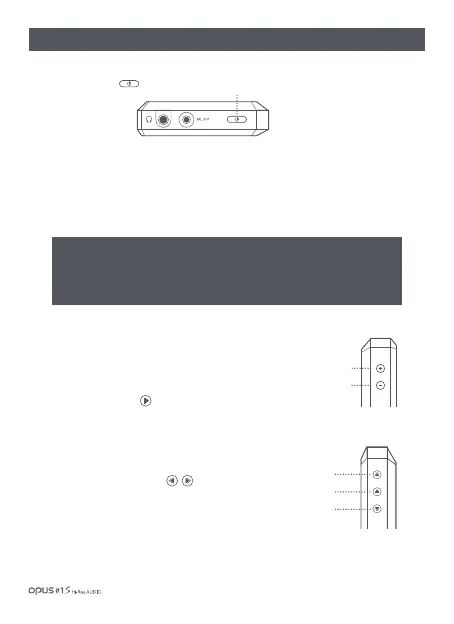
Volume Up
⊕
Volume Down
⊖
| Button operation and functioning
※ Caution! Read carefully. (Reset Function)
1. If the device shows signs of unexpected failure, freeze, press the power button for
more than 10 seconds to force a shutdown and reset the device.
2. Do not use this reset function an any other case besides the device failure and freeze.
Volume adjustment button
1. Volume up (+) / down (-): Volume can be adjusted
from 0 to 150 step.
Play/Pause button
1. Press the Play/Pause button to play a song. Press the Play/
Pause button to pause a song if being played.
1. Turning power On/Off :
Long press (over 2 secs.) the Power button to turn on the device.
While the device is on, long press the Power button (over 2 sec.) to turn off the device.
1. Short press Previous button to start a song from the
beginning and a short press Previous button
(within 5 seconds) again to play a previous song.
2. Press Next button to play next song.
Previous/Next buttons
Power
2. Turning the screen On/Off :
While the screen is on, press the Power button to turn off the screen.
Press the button again to turn off the screen.
Previous
Next
Play/Pause
Getting Started / 05
Power



 To Next Page