Need help?
Do you have a question about the Therabody SmartGoggles and is the answer not in the manual?
Overview of Therabody SmartGoggles, their features like heat, vibration, massage, and SmartSense Technology.
SmartGoggles aim to provide relief to the eyes and head, promoting relaxation and improving sleep quality.
Step-by-step guide on how to place, align, and use the SmartGoggles for treatment.
Instructions to download the Therabody App for enhanced customization and access to TheraMind content.
Explanation of Power, Vibration, and Heat buttons and their functions for different modes.
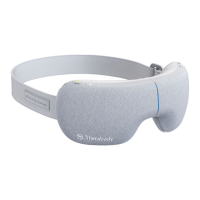
Identifies the SmartGoggles device, USB-C cable, soft case, and instruction manual.
SmartRelax mode uses heat and heart-rate-based vibration for quick relaxation.
Focus mode releases tension between eyebrows, aiding relaxation and focus with heat.
Sleep mode massages temples with slow-wave vibration to promote sleepiness.
The Therabody SmartGoggles are a science-backed wearable device designed to provide relief to the eyes and head, promoting relaxation and sleep. This innovative device combines gentle heat, targeted vibration, and soothing massage, enhanced by SmartSense Technology™ which uses biometric data to personalize the user experience and maximize results.
The SmartGoggles offer three unique modes: SmartRelax, Focus, and Sleep, each strategically designed to address specific needs.
Beyond the core modes, the SmartGoggles also incorporate additional features to enhance the user's experience. Combining vibration with a gentle massage increases blood circulation to the eyes, which helps reduce eye strain and irritation. The device is intended to strengthen the connection between the mind and body, contributing to overall well-being. For an enhanced experience, users can pair the SmartGoggles with TheraMind content available in the Therabody App.
To begin using the SmartGoggles, users should first place the device on clean, dry skin, ensuring any makeup, eyeglasses, or contact lenses are removed. The device should be positioned on the head with the strap adjusted so that the goggles align perfectly with the temples and sit comfortably on the nose bridge. Crucially, the heart rate sensor must maintain contact with the cheekbone for accurate biometric data collection. During treatment, users are advised to keep their eyes closed and avoid frequent movement, as this may impact heart rate tracking.
The SmartGoggles are operated via a Power Button. A long press of the Power Button switches the device ON. Once on, a short press of the Power Button allows users to toggle through the different modes: SmartRelax, Focus, and Sleep.
For further customization, the SmartGoggles feature two additional buttons: a Vibration Button and a Heating Button, each offering three intensity levels.
To turn off the SmartGoggles, a long press of the Power Button is needed, ensuring the Battery status LED is OFF.
The SmartGoggles seamlessly integrate with the Therabody App via Bluetooth. This connectivity allows for deeper customization of the device settings and provides access to exclusive TheraMind content, enriching the overall user experience.
The SmartGoggles are USB-C enabled and come with a Therabody USB-C to USB-A cable. The USB port is conveniently located on the side of the device, behind the Power Button. Before charging, it's important to ensure that the battery status LED light is OFF. To charge, simply insert the USB-C cable into the port. The battery level is indicated by an LED next to the USB-C connector: Orange signifies a low charge, Blue indicates a mid-charge, and Green means fully charged. During charging, the LED will flash to show a proper connection and will turn solid green once charging is complete. Users are advised to use a certified charger from a reputable manufacturer that has not suffered structural damage. It is also important not to use the device while it is charging.
Maintaining the SmartGoggles is straightforward. For cleaning, the inner fabric should be wiped with a non-abrasive, lint-free cloth. If necessary, the cloth can be lightly dampened with water or an alcohol-based solution for a more thorough clean. After cleaning, the SmartGoggles should be dried with a non-abrasive, lint-free cloth. It is crucial to remember that SmartGoggles are NOT waterproof or machine washable, and excess liquids or water should not be allowed to enter the product. The device should not be bleached, dry cleaned, ironed, or tumble dried.
 General
| Bluetooth | Yes |
|---|---|
| Proper use | Face |
| Massage types | Combo massage |
| Product color | Gray |
| Battery life | 150 min |
| Power source type | Battery |
 Weight and Dimensions
| Depth | 120 mm |
|---|---|
| Width | 210 mm |
| Weight | 420 g |

 To Next Page