Need help?
Do you have a question about the Thermaltake H200 and is the answer not in the manual?
Details the internal USB 2.0 9-pin headers on the hub for connecting internal devices.
Explains the SATA power adapter used to connect the hub to the PC's power supply.
Describes the micro USB data cable connecting the hub to the motherboard for data transfer.
Points out the LED indicator on the hub, likely for status indication.
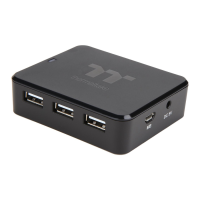
Identifies the external USB 2.0 Type-A ports for connecting USB devices.
Notes the magnets located on the bottom for mounting the hub.
Instructions for attaching the hub to a steel surface using its embedded magnets.
Guide on connecting the hub to the PC's power supply using the SATA-to-DC adapter.
Details on connecting the micro USB data cable to the hub and motherboard.
Instructions for connecting USB devices to the hub's ports.
The Thermaltake H200 Internal USB Hub is a versatile accessory designed to expand the USB connectivity within a PC case, providing additional ports for various internal and external USB devices. This hub is specifically engineered to integrate seamlessly into a computer's internal structure, offering a clean and organized solution for managing USB connections. Its primary function is to convert a single internal USB 2.0 9-pin header from the motherboard into multiple usable USB ports, both in the form of additional 9-pin headers and standard Type-A ports.
One of the key usage features of the H200 Internal USB Hub is its flexible installation. The device is equipped with embedded magnets on its bottom surface, allowing it to be securely attached to any steel surface within the PC case. This magnetic mounting system provides a convenient and tool-free installation process, enabling users to position the hub optimally to suit their cable management needs. The magnetic attachment ensures that the hub remains firmly in place, even during movement or vibrations of the PC case. Users are advised to maintain a safe distance between the magnets and any objects that could be damaged by magnetism, ensuring the safety of other components within the system.
Powering the H200 Internal USB Hub is straightforward, utilizing a SATA-to-DC power adapter. This adapter connects the hub to the PC's power supply unit (PSU) via a standard SATA power connector. Before connecting the power, it is crucial to ensure that the PC is powered off to prevent any electrical issues or damage. This power connection ensures that the hub receives stable and sufficient power to support all connected USB devices, preventing potential performance issues that can arise from underpowered USB ports.
Data connectivity for the H200 Internal USB Hub is established through a Micro USB Data Cable. This cable connects the hub to an internal USB 2.0 9-pin header on the motherboard. This connection allows the hub to communicate with the PC, enabling data transfer for all connected USB devices. The firm connection of this cable is essential for reliable operation, ensuring that all USB devices connected to the hub can properly interact with the computer system.
The H200 Internal USB Hub offers multiple expansion options for USB devices. It provides several internal USB 2.0 9-pin headers, which are ideal for connecting internal USB devices such as RGB lighting controllers, fan controllers, or other internal peripherals that require a 9-pin USB connection. In addition to these internal headers, the hub also features multiple USB 2.0 Type-A ports. These Type-A ports are suitable for connecting standard external USB devices, such as wireless dongles, USB drives, or other peripherals that might be placed inside the case for a cleaner setup or for devices that are not frequently accessed. This dual functionality—providing both internal headers and external Type-A ports—makes the H200 a highly versatile solution for expanding USB connectivity.
An LED indicator is integrated into the design of the H200 Internal USB Hub. This indicator provides visual feedback on the operational status of the hub, allowing users to quickly ascertain if the device is powered on and functioning correctly. This simple yet effective feature aids in troubleshooting and ensures that the user can confirm the hub's active status at a glance.
In terms of maintenance features, the H200 Internal USB Hub is designed for ease of use and reliability. Its robust construction and magnetic mounting system contribute to its durability and stable placement within the PC case. The straightforward connection process for power and data cables minimizes the chances of incorrect installation, which is a common cause of device malfunction. Should any issues arise, the user manual provides clear instructions for installation and usage, guiding users through the setup process. For more complex issues or if the device does not function properly after following the instructions, users are directed to contact their local store or Thermaltake branch office for after-sales service. Additionally, Thermaltake's website is provided as a resource for technical support, offering a convenient avenue for users to seek assistance and find solutions to potential problems. This comprehensive support system ensures that users can maintain their device and resolve any operational difficulties efficiently. The design of the hub, with its clear labeling of ports and connections, further simplifies the process of connecting and managing USB devices, reducing the likelihood of errors during setup or modification of the system. The internal placement of the hub also contributes to a cleaner aesthetic within the PC build, as it helps to consolidate and organize internal USB cables, reducing clutter and improving airflow.
 General
| Ports quantity | 6 |
|---|---|
| USB 2.0 ports quantity | USB 2.0 ports have a data transmission speed of 480 Mbps, and are backwards compatible with USB 1.1 ports. You can connect all kinds of peripheral devices to them. |
| Product color | Black |
| Housing material | Plastic |
| Quantity per pack | 1 pc(s) |
 Weight and Dimensions
| Depth | 21.6 mm |
|---|---|
| Width | 76.8 mm |
| Height | 64.7 mm |

 To Next Page