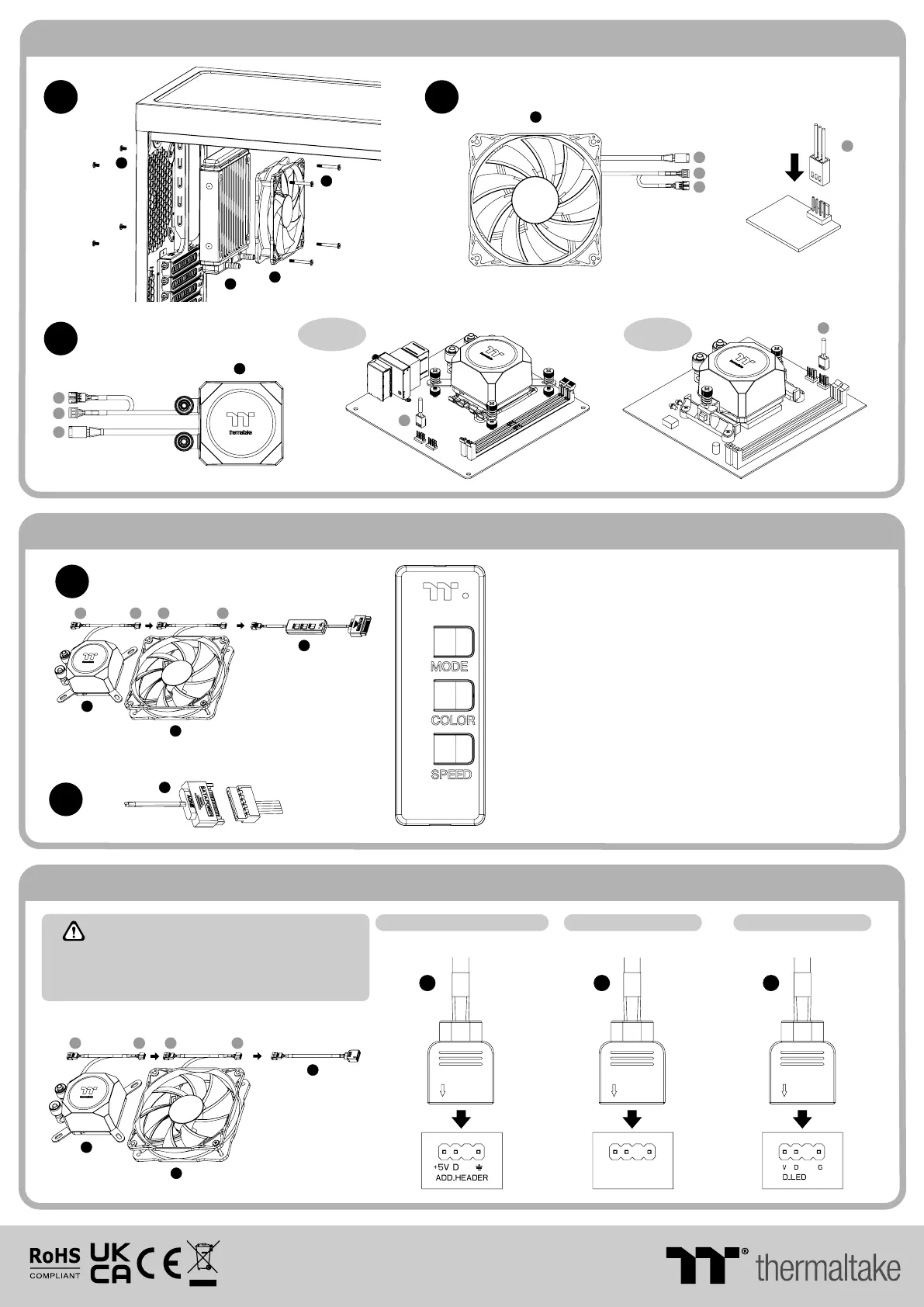
ARGB Controller Installation Guide
MB SYNC Installation Guide
Installation Guide
O
I
A
FAN
CPU FAN
J
1
X
© 2022 Thermaltake Technology Co., Ltd. All Rights Reserved.
www.thermaltake.com
1. Light Mode:
Switch over between 7 LED modes.
3. Light Speed:
Switch over between 4 light modes.
When light mode is in RGB Spectrum:
Click to memorize and lock the color you want, click again to unlock the 256
colors auto rotation.
Red → Yellow → Green → Teal → Blue → White → Purple
When light mode is in Ripple :
Switch over 7 LED colors .
When light mode is in Wave and Flow :
LED color can not be adjusted.
Red → Yellow → Green → Teal → Blue → White → Purple → Rainbow
2. Color Mode:
When light mode is in Full Lighted, Pulse and Blink :
Switch over 8 LED colors .
Rainbow → Full light → RGB Spectrum → Off → Flow → Radar → Pulse → Blink
Slow → Normal → Fast → Extreme
Please power off the PC and check the Positive and Negative
ends on the connector before connecting the cable to
mainboard. Connecting the wrong end can damage the fans.
CAUTIONCAUTION
ASUS/A SRock/B IOSTAR
GIGABYTE
MSIMSI
2
SATA
AOURS RGB Fusion with Digital LEDs
JRGB-strip Header(S)Aura Addressable Strip Header(s)
N
F
O
O
N
A
A
1
Y
Y
Z
Z
F F F
+5V D G
JRAINBOW
1
3
S
S
S
V
V
V
W
W
W
Intel
or
AMD
CPU FAN
PORT
CPU FAN PORT
A
O
2
X
Y
Z
210 mm
297 mm
刀模線
10 5G是X X
雙銅
單色 無無
其他特殊處理效 果表面處理
2
厚度(g/m )
折數 材質雙面印刷 印刷色彩單面印刷
規格樣式
單張
CHECK DESIGN
藍色線條為尺寸標示,請勿印刷上去!
產品料號
CL - W285 - PL12 S W-B
TH 1 20 ARG B S ync
說明書
22 /02/1 2
A
產品名稱
印刷項目
發稿日期
版本
Peipei
(22/02/12)
Leon
(22/02/12)




 To Previous Page