
 Need help?
Do you have a question about the Thermaltake TH360 ARGB Sync and is the answer not in the manual?
Select the correct mounting bracket for Intel LGA 1366, 1200, 115x sockets.
Attach the Intel mounting bracket and backplate to the motherboard.
Apply thermal paste and then mount the CPU cooler onto the CPU.
Connect the pump and fan cables to the appropriate motherboard headers.
Select the correct mounting bracket for AMD AM4, AM3+, AM2+ sockets.
Attach the AMD mounting bracket and backplate to the motherboard.
Apply thermal paste and then mount the CPU cooler onto the CPU.
Connect the pump and fan cables to the appropriate motherboard headers.
Mount the fans onto the radiator unit.
Assemble the pump unit onto the CPU block.
Prepare the Intel or AMD specific mounting mechanisms.
Connect pump and fan headers to motherboard for power and control.
Switch between 7 different LED lighting modes.
Adjust LED colors based on the selected light mode.
Cycle through 4 different LED lighting speeds.
Connect to Aura Addressable Strip Headers for synchronization.
Connect to JRGB-strip Headers for synchronization.
Connect to AOURS RGB Fusion headers for synchronization.
 General
| Noise level | 28.2 dB |
|---|---|
| Tube material | Rubber |
| Thermal grease | Yes |
| Country of origin | China |
| Fan connector | 4-pin |
| Product color | Black |
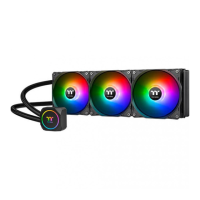
| Number of fans | 3 fan(s) |
| Illumination color | Blue, Green, Red |
| Water block material | Copper |
| Type | All-in-one liquid cooler |
| Fan speed (max) | 1500 RPM |
| Maximum airflow | 59.28 cfm |
| Pump motor speed | 3300 RPM |
| Suitable location | Processor |
| Maximum air pressure | 1.31 mmH2O |
| Supported processor sockets | LGA 1150 (Socket H3), LGA 1151 (Socket H4), LGA 1155 (Socket H2), LGA 1156 (Socket H), Socket AM2, Socket AM2+, Socket AM3, Socket AM3+, Socket AM4, Socket FM1, Socket FM2 |
| Pump current | 370 mA |
| Pump voltage | 12 V |
| Harmonized System (HS) code | 84733080 |
 Weight and Dimensions
| Weight | 1430 g |
|---|---|
| Tube length | 400 mm |
| Radiator depth | 27 mm |
| Radiator width | 153 mm |
| Radiator height | 120 mm |
| Fan dimensions (W x D x H) | 120 x 120 x 25 mm |



 To Next Page