99
Thermann Owner's Manual
Thermann X Split Heat Pump
98
TIME AND BLOCK OUT SETTING
CURRENT TIME SETTING
This product contains a built-in clock as part of the water heating cycle logic and refers
to the current time. It is necessary to set the clock before starting to use the product. The
current time can be set in the 'Clock Setting Mode' as described below.
Note :
There is no need to adjust the time setting for the daylight saving period. Even if the
installation is conducted during the daylight saving period, the clock setting to the ordinary
time (not daylight saving time) is preferable.
1. Switching to Clock Setting Mode
Press the “Enter” key in the Clock Display Mode to switch to the Clock Setting Mode.
Time Display starts flashing once the mode is switched.
2. Setting the Clock
The time setting can be adjusted by pressing "▲” and “▼” keys. Fast forward and rewind
are available by pressing and holding down a key.
3. Confirming Time Setting
After the clock is adjusted to the current time, press the Enter key to confirm the
setting. The time display stops flashing and comes on once the setting is finished.
CAUTION :
The setting automatically goes back to the Clock Display Mode when no panel
operation is performed for more than 60 seconds in the Clock Setting Mode. If this
occurs, changes made will not be reflected to the setting. Depending on the set time,
the system will start its heating cycle.
Note :
If no buttons are pressed on the panel for more than 60, the display goes into sleep
mode and the Panel is blank except for the operation status light. Sleep Mode is
turned o when any button is pressed. ▲, ▼ or Enter key is pressed.
TIME AND BLOCK OUT SETTING (CONT.)
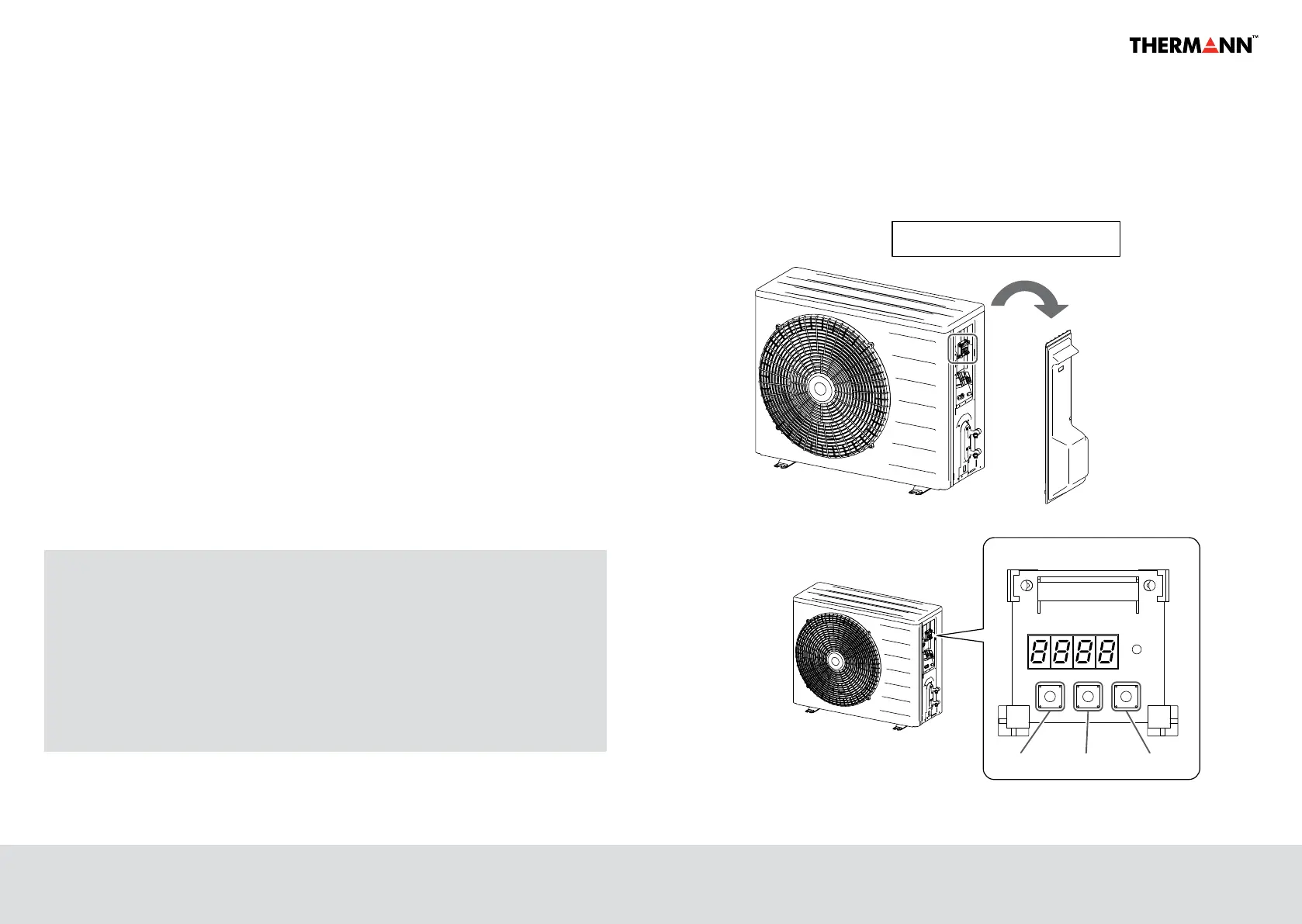
Figure 9 : How to operate the controller
▲ ▼ Enter
“▲”key
Operation Panel
“▼”ke “Enter”key
How to use the operate controller
remove the piping cover (1 screw)
key
Figure: How to operate the controller
Figure 9 : How to operate the controller
▲ ▼ Enter
“▲”key
Operation Panel
“▼”ke “Enter”key
How to use the operate controller
remove the piping cover (1 screw)


 To Next Page