16 | P a g e
Part Number - 00824 Revision K, DCO 2017-0074
© 2017 Thermedx
®
, LLC
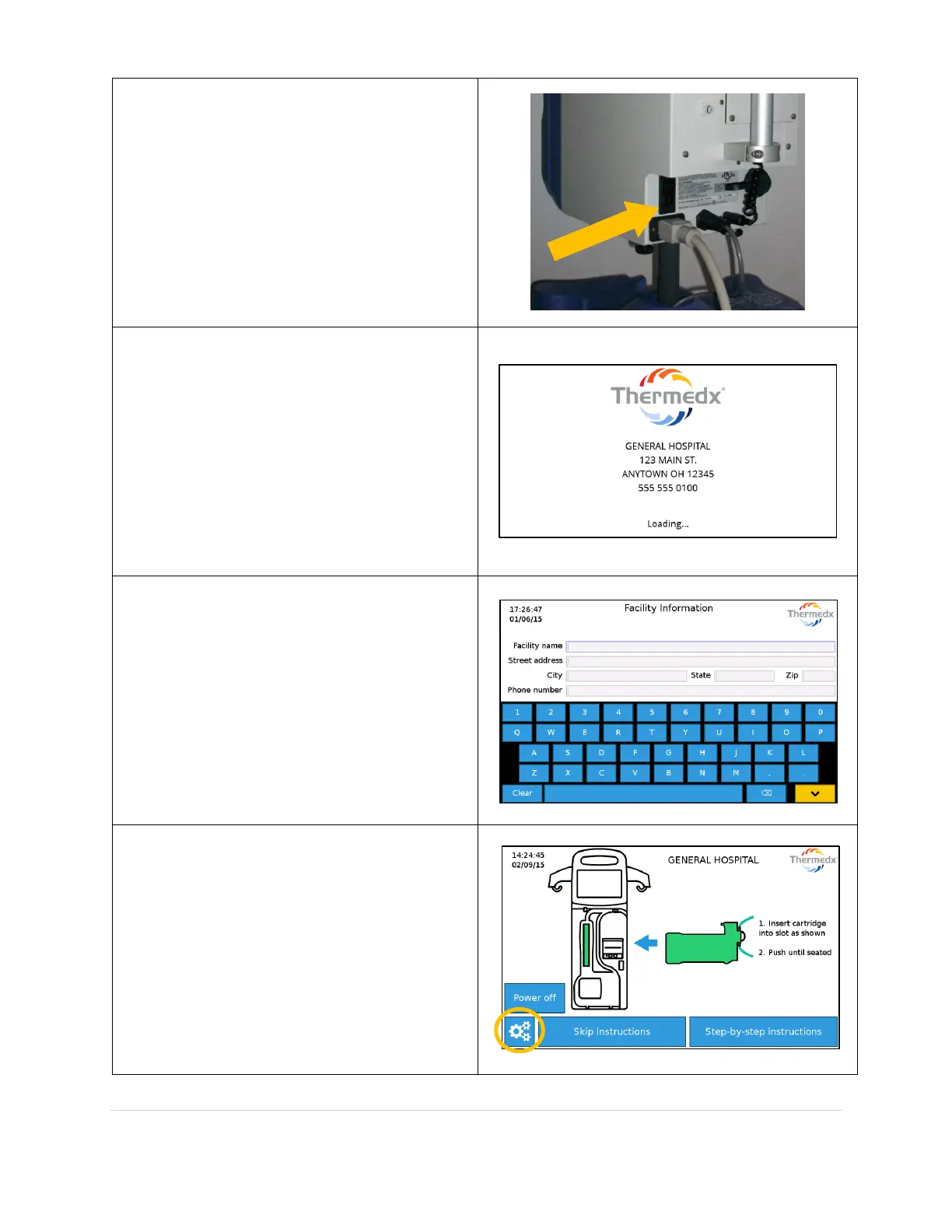
If a P2000 model, Power On the fluid
management system by plugging the unit into
a dedicated 120 volt 20 amp outlet and
turning the power switch in the rear lower
right corner to the On position.
If a W2100 model, Power On the fluid
management system by plugging the unit into
a dedicated 240 Volt 10 amp outlet and
turning the power switch in the rear lower
right corner to the On position.
The product will power on and display a
splash screen. A startup screen showing the
facility information will appear while the
software loads.
The system will prompt the user for a facility
name and address if one is not entered. Enter
information by touching an empty field and
using the on screen keyboard to fill it in.
Dismiss the keyboard with the yellow down
button, then press Save when finished. The
facility information will be included on
procedure summary tickets, as well as
displayed on the startup screen.
The date, time, and sound level can be
adjusted in the settings screen, accessible
with the Gear Icon.



 To Next Page