M 525211282207062021 THERMEX TYPHOON 77
ENGLISH
»
OPERATION OF TYPHOON
OPERATION OF TYPHOON
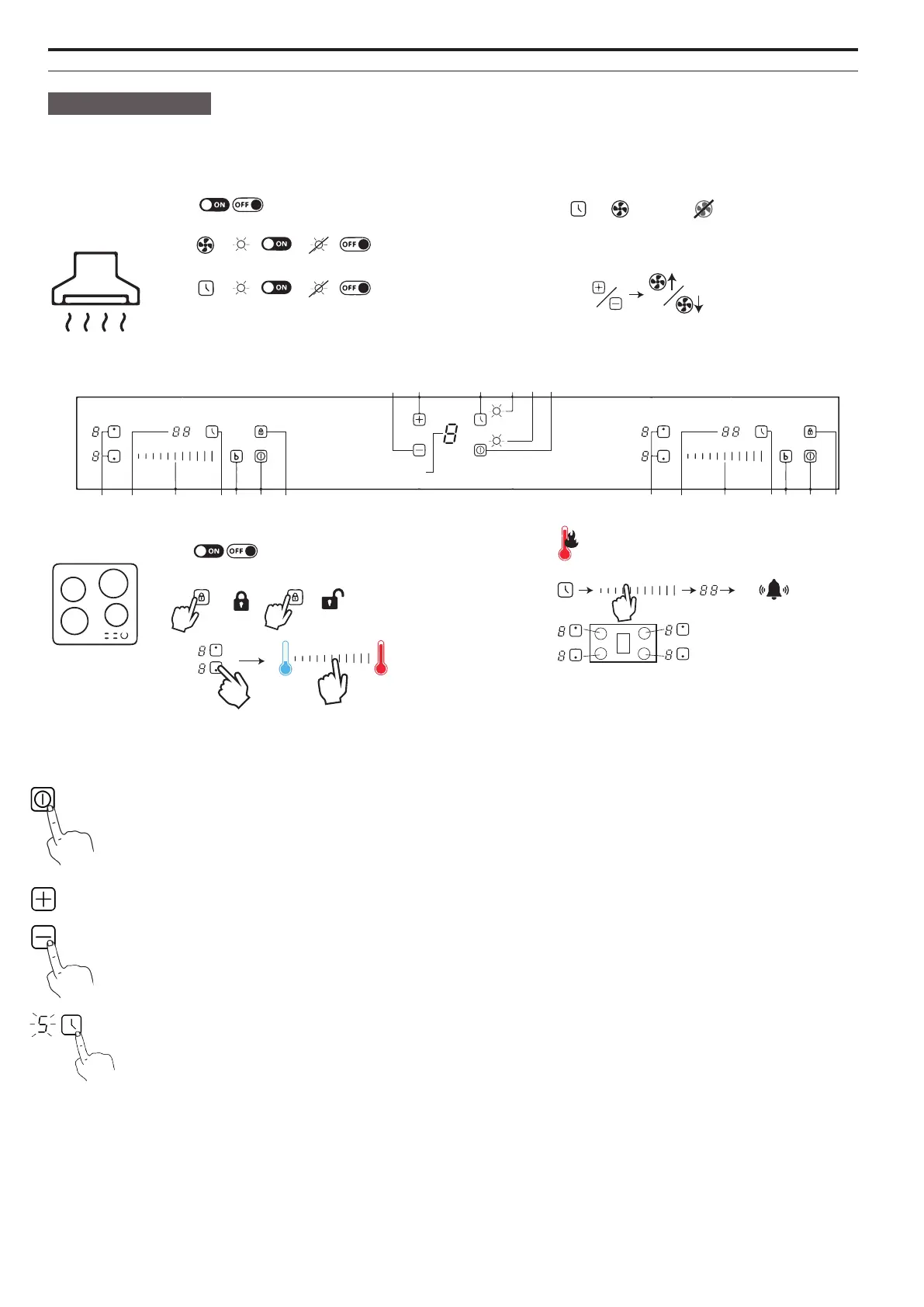
Control panel:
14
9 8
13
12
11 10
2
5
76a 3
4 1
2
5
7
6b
3 4 1
1:
2:
3:
4:
+
5:
min.
. . .
6:
a
b
8:
9:
=
=
10:
=
=
11:
5 min.
=
... ...
12: Display
13/14:
LOCK
=
UNLOCk
=
3 sec.
EXTRACTOR HOOD:
ON / OFF button: When the unit is in standby, press the ON / OFF button. The light indica-
tors in the display now light up and the hood turns on in step 1 by default.
When the cooker hood is in operation, press the ON / OFF button again to switch o the
cooker hood. The device is now in standby mode again.
”+” / ”-” button: The hood has three speeds; low, medium and high speed. Press ”+” to
increase the speed of the hood. Press ”-” to slow down the hood.
Timer button: When the hood is in use, press the timer button. The timer indicator lights
up and the timer function is now active. By default, the timer is set to 5 min. operation.
If a dierent speed level is selected, the timer will switch o.


 To Next Page