- 14 -
SetupLoop
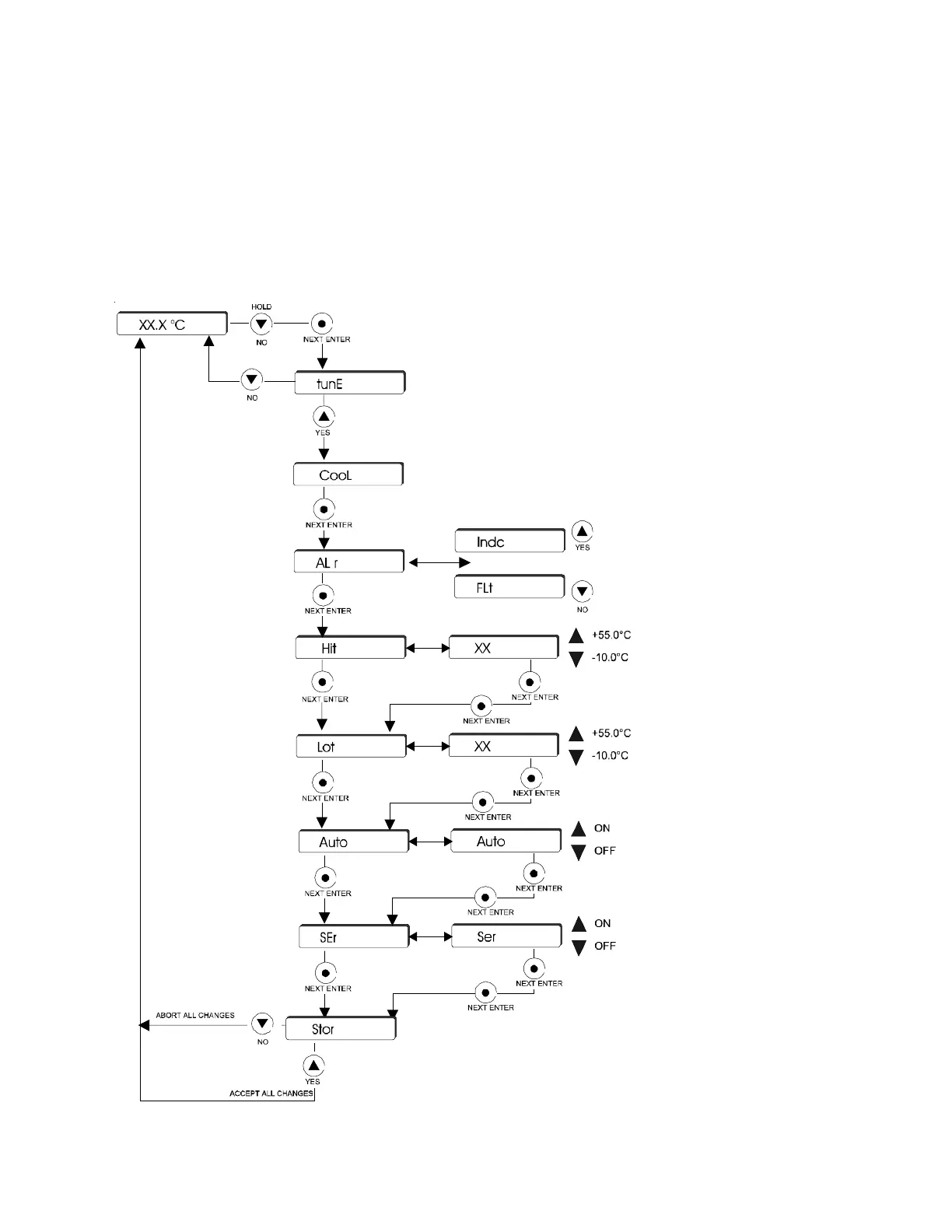
The controller is used to tune the COOL PID values; configure the unit to
continue to run (Indc) or shut down (FLt) in the event of a fault; set the high
(Hit) and low (Lot) temperature limits; and enable/disable auto restart (Auto). If
a temperature limit is exceeded the controller will display an error code, see
Section VI.
NOTE: Serial Communication (SEr) is not operational. Ensure the display
indicates OFF.
Setup Loop
CooL is used to adjust the controller's PID values. However,
Thermo recommends only a qualified technician change the PID
values. Incorrect values will hamper unit performance. Factory set
values are: P = 15; I = 0.3; D = 0.0.
With the controller displaying the fluid temperature, press and
hold the NO key and then press the NEXT ENTER key. The
controller will display tunE. Press YES to display CooL.
Press NEXT ENTER to display Stor, press YES
to accept all the changes, press NO to abort
all changes and restore all the previous
values. The controller will again display the
fluid temperature.
Press NEXT ENTER to display the
alarm (ALr) prompt. Press YES to
display Indc and have the unit
continue to run in the case of a fault.
Press NO to display FLt and have the
unit shut down in the case of a fault.
The factory preset is FLt.
Press NEXT ENTER to display the
high temp (Hit) alarm setting. If
desired, use the arrow keys to
change the value. The factory
preset value is 55°C.
Press NEXT ENTER to display the
low temp (Lot) alarm setting. If
desired, use the arrow keys to
change the value. The factory
preset value is -10°C.
Press NEXT ENTER to display
the auto restart (Auto) prompt.
Use the arrow keys enable/
disable this feature. The factory
preset is OFF.
Press NEXT ENTER to display the
serial comm (SEr) prompt. The
display should flash NO. If not,
use the arrow keys until NO is
displayed.



 To Next Page