Thermo Scientific Harris Ultra-Low Temperature Freezers Installation and Operation
4
5 Operation (Harris DLT and SLT Freezers)
5.1 Control Panel Features
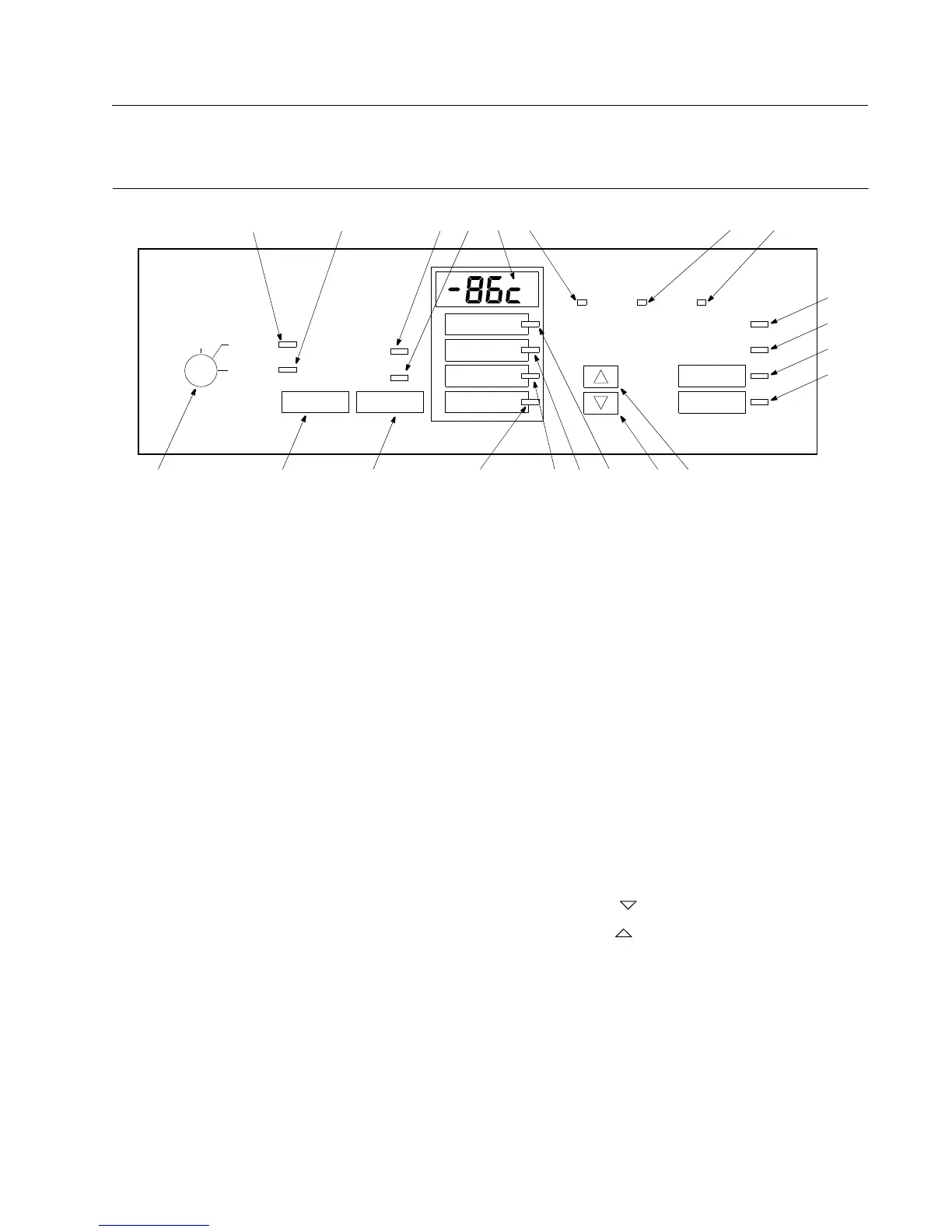
Figure 3. Harris DLT and SLT Control Panel with Optional Backup System
OFF
EXTREME
AMBIENT ALERT
CLEAN FILTER
POWER FAILURE
TEMPERATURE
FAILURE
ALARM TEST ALARM RESET
CABINET
TEMPERATURE
CONTROL
SET POINT
ALARM
BATTERY LOW
VOLTAGE LOW
WARM ALARM
SET POINT
COLD AL ARM
SET POINT
POWER ON
ALARM ON
1 11
2
7
8
9
10
17
18
193
SUPPLY
ON
SUPPLY
EMPTY
BATTERY
LOW
BACKUP SYSTEM
45
6
20 21
12
16
15
1413
SET POINTS
LOCKED
9. Alarm Battery Low Indicator. This indicator lights when the
charge on the alarm battery is low. Press this button to
display the percent of full battery charge in the digital display
window.
10. Voltage Low Indicator. This indicator lights when incoming
line voltage to the freezer is low. Press this pad to display the
current line voltage in the digital display window.
11. Alarm Test Pad. Press this pad to start an alarm test (refer to
Section 5.2.5 on page 6).
12. Alarm Reset Pad. Press this pad to reset slowly blinking
indicators. Slowly blinking indicators (the Silent Witness
feature) denote that the condition has occurred but is now
within the given operating parameters. This pad is also
depressed to temporarily silence the audible alarm (refer to
Section 5.2.4 on page 5).
13. Cold Alarm Set Point. Press this pad to set the cold alarm
(refer to Section 5.2.3 on page 5).
14. Warm Alarm Set Point. Press this pad to set the warm alarm
(refer to Section 5.2.3 on page 5).
15. Control Set Point. Press this pad to set the cabinet
temperature (refer to Section 5.2.2 on page 5).
16. Cabinet Temperature Indicator. This indicator lights when the
temperature display window is showing the cabinet
temperature (refer to Section 5.2.1 on page 5).
17. Decrement Pad ( ). Use this pad to decrease temperature
values.
18. Increment Pad ( ). Use this pad to increase temperature
values.
The following indicators are available only when the freezer is
equipped with the optional backup system (refer to Section 6.4
on page 7).
19. Backup System Supply On Indicator.
20. Backup System Empty Indicator
21. Backup System Battery Low Indicator.
Before the initial start up, take some time to become familiar
with the controls on your freezer. Figure 3 illustrates the Harris
DLT and SLT Chest and Upright Freezer control panel.
Note: Figure 3 shows all possible functions. These functions
vary depending on the model and options. You may not
have all of the functions on your equipment. Harris DLT,
and SLT models include the Set Points Locked feature
and the Extreme Ambient Alert indicator light (8). The
CO
2
or LN
2
Backup System lights (20, 21, 22) represent
status indicators for a built-in CO
2
or LN
2
backup
system, which is optional on Harris DLT and SLT
models.
1. Three position keyed Power On Switch.
2. Power On Indicator. This indicator lights when power is
connected to the freezer.
3. Alarm On/Set Points Locked Indicator. This indicator lights
when the alarm is activated. Also indicates that Set Points are
locked.
4. Power Failure Indicator. This indicator lights when there is a
power failure to the freezer (refer to Section 8 on page 10).
5. Temperature Failure Indicator. This indicator lights when the
freezer temperature deviates either above or below the alarm
temperature settings.
6. Digital Temperature Display Window. This window displays
chamber temperature, alarm values, etc. depending on the
operating status of the freezer and the procedure being
performed.
7. Extreme Ambient Alert. This indicator lights when the
ambient temperature has exceeded the upper limit of the
recommended operating range. If the Extreme Ambient Alert
is activated, the ambient environment needs to be improved
for proper function of the freezer.
8. Clean Filter Indicator. This indicator lights when the air
cooled condenser filter is dirty (refer to Section 8 on
page 10).



 To Next Page