11
4.Use and Operation Instruction of Wire Controller
2.2 Settings and viewing the set point (Desired water temperature)
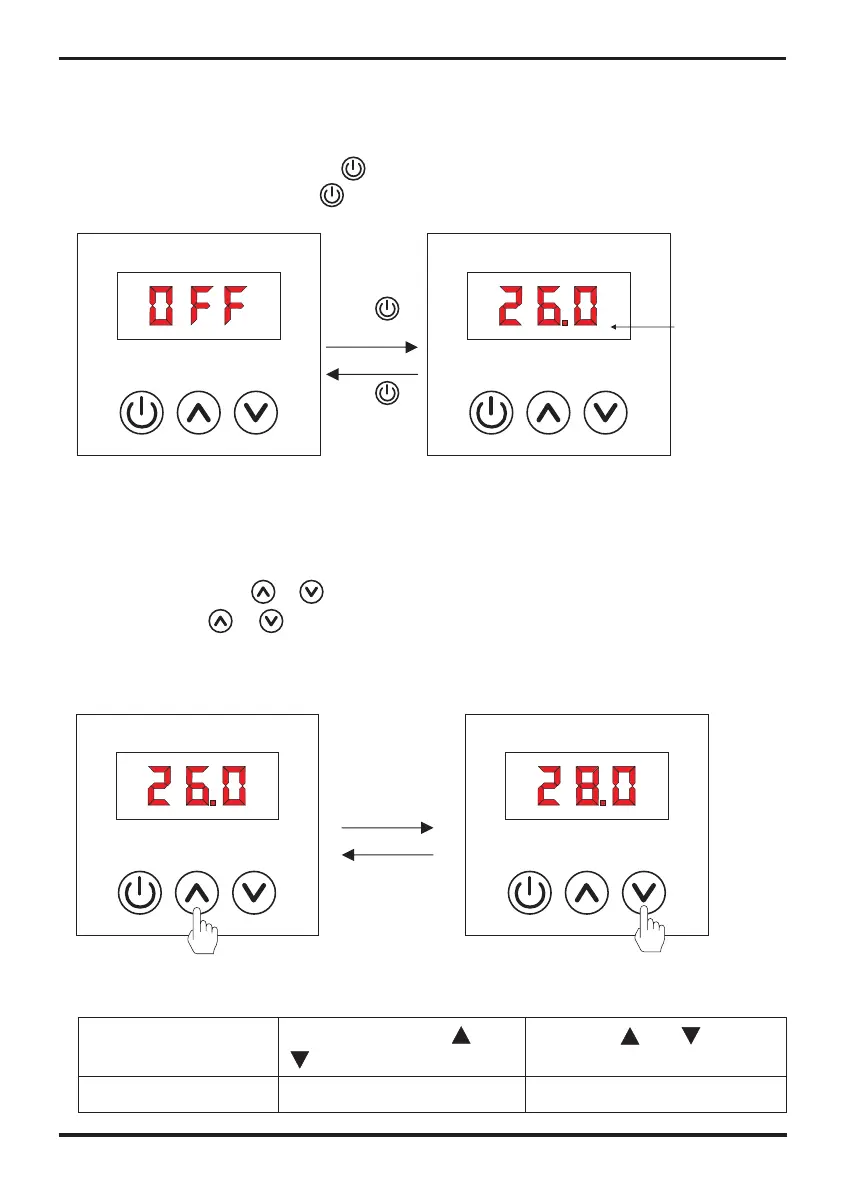
In OFF mode and in ON mode
Press once the button or to view the set point.
Press the button or again to set the desired set point.
Note: The settings are automatically saved after 3 s if no button is pressed.
Remark:
Long press for more
than 2s to change each time
“ ” or “ ”
Short press, long press
“ ” to change each time within 2s
“ ” or
Operation
Range of temp. Variation
0.5℃ / 1℉
1℃ / 1℉
Standby interface
Running interface
Actual water
temp.
2.1 ON/ OFF mode
2. The controller usage
When the unit is off, press the key and hold on for 0.5-5 seconds to turn on the unit;
When the unit is on, press the key and hold on for 0.5-5 seconds to turn off the unit.
Press
for 0.5-5 s
Press
for 0.5-5 s


 To Next Page