25
ControlPanel
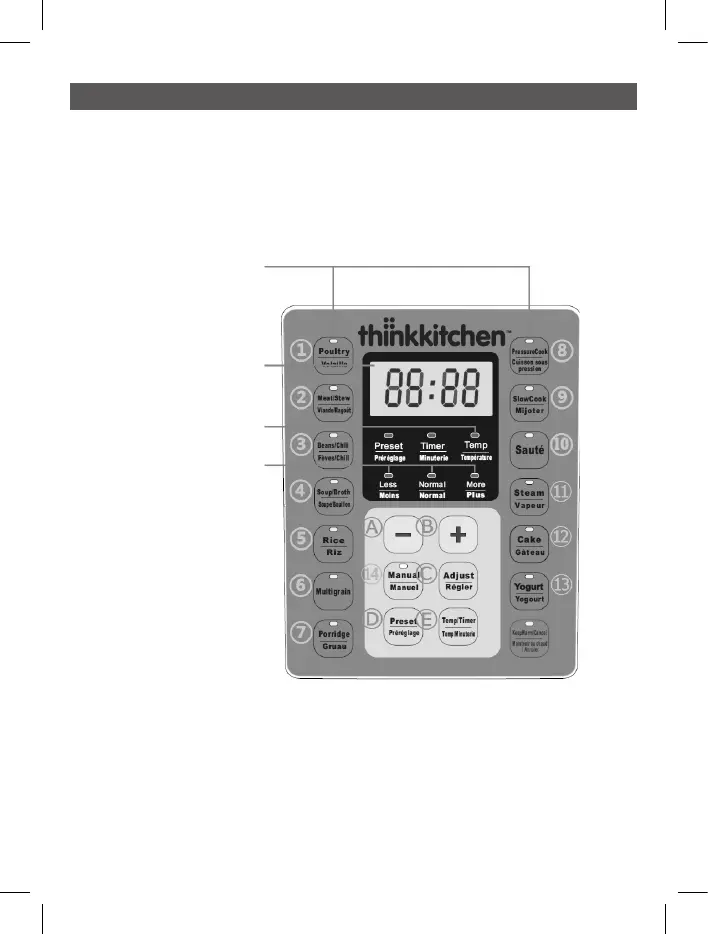
The control panel of the multi-pot consists of a LED screen, 14 Cooking Program Keys,
5 Operation Keys, 1 Cancel Key and many indicator lights
Operation keys
A (-) & B (+): Press these keys to adjust the time.
C (Adjust): Press this key to select the mode (Less, Normal, More).
D (Preset): Press this key to set time to delay the start. Preset is available for Poultry,
Meat/Stew, Beans/Chili, Soup/Broth, Rice, Multigrain, Porridge, Pressure Cook,
Slow Cook, Steam and Manual, but not available for Sauté, Cake and Yogurt.
E (Temp/Timer): Temp can adjust the temperature of Sauté function using the - and +
keys. Timer can adjust the Cooking Time for Poultry, Meat/Stew, Beans/Chili,
Soup/Broth, Multigrain, Porridge, Pressure Cook, Slow Cook, Sauté, Steam,
Yogurt and Manual with - and +.


 To Next Page