9
Connecting the charging cable for the fuse box
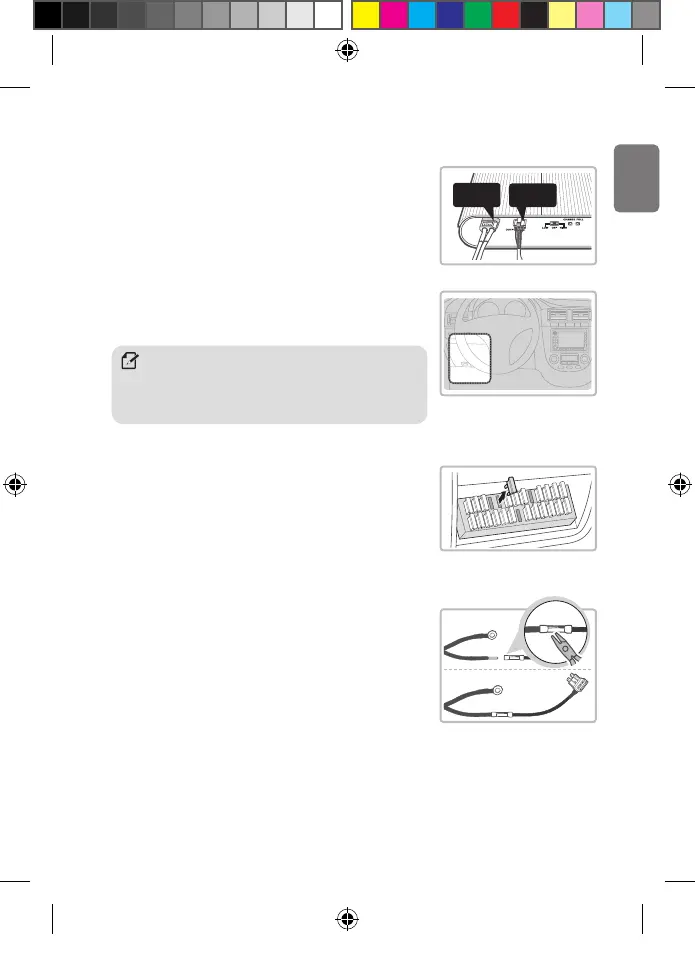
You can connect the product to the fuse box using the charging cable for the fuse box.
1. With the product’s power switch in the OFF position, connect
the charging cable for the fuse box and output cable to the
product’s cable connectors.
2. Open your vehicle’s fuse box, check the fuse standard, and
select the correct fuse holder between the included fuse
holders.
3. In the fuse box, locate and remove the fuse for the accessory
power supply.
y The accessory power (ACC) contacts supply power only when the
engine is turned on.
y Install the continuous power supply cable to fuse contacts that
are 15A or less.
4. Insert the input cable into the sleeve at the end of the fuse
holder cable, and then secure it by squeezing on the sleeve
using appropriate tools, such as pliers.
Note
The fuse box location in the vehicle may vary depending on the
manufacturer and model of your vehicle. For more information,
refer to your vehicle’s manual.
Charging
cable
Output
cable
BAB-50_QSG.indb 9BAB-50_QSG.indb 9 2024-03-06 오전 9:55:202024-03-06 오전 9:55:20


 To Next Page