10
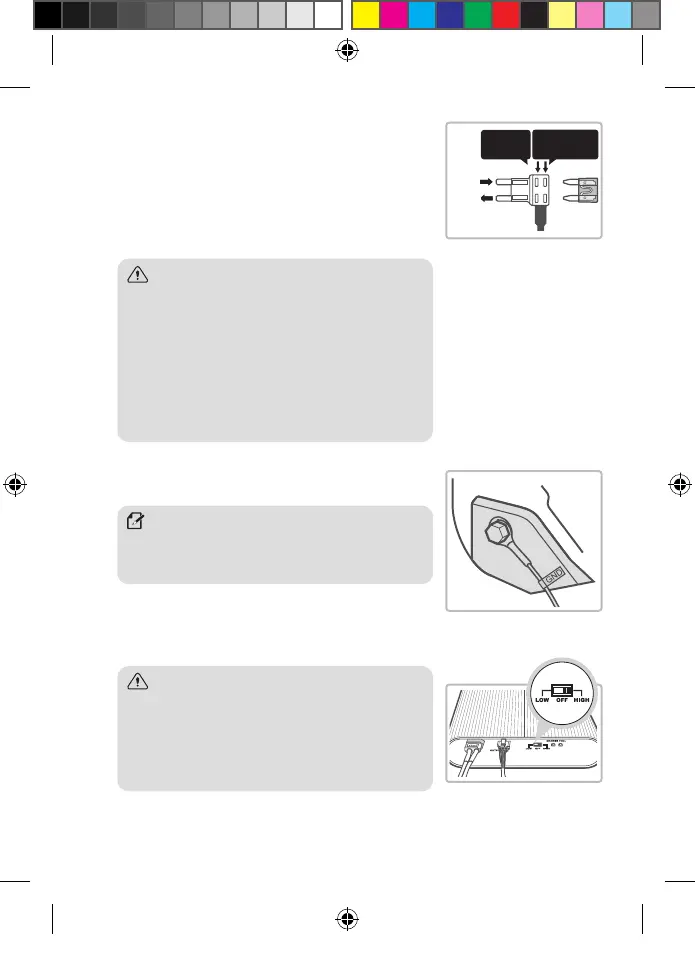
5. Install the continuous power supply fuse removed from the
fuse box, and a fuse supplied with the product into the fuse
holder, and then install the fuse holder into the accessory
power (ACC) contacts in the fuse box.
y If the fuse from the fuse box does not t in the fuse holder, use
other fuses that are supplied with the product.
y Check the fuse contacts in the fuse box with a tester, and ensure that
the output contact is connected to the fuse holder’s input contact.
6. Find a bolt xed on the vehicle’s chassis, and connect the
ground (GND) cable to the bolt.
7. Set the power switch to HIGH.
Caution
y THINKWARE is not responsible for any problems and/or
damages caused by unauthorized part modification, such
as soldering fuses to cables, without using the fuse holders
supplied with the product.
y Ensure that the fuse holder is installed correctly for proper
input and output connection. The fuse may blow if input
and output connection is incorrect. THINKWARE is not
responsible for any problems and/or damages to the
vehicle due to an incorrect connection.
Fuse supplied
with the product
Fuse from
the vehicle
Note
If the vehicle’s bolt is coated, remove the coating before
connecting the ground (GND) cable. The power may not be
supplied correctly due to the coating.
Caution - Operation modes depending on the
power switch settings
y HIGH: High-speed charge mode (7 A), used when the
battery is connected to the fuse box.
y LOW: Normal-speed charge mode (5 A), used when the
battery is connected to the cigarette lighter socket.
INPUT
OUTPUT
BAB-50_QSG.indb 10BAB-50_QSG.indb 10 2024-03-06 오전 9:55:212024-03-06 오전 9:55:21


 To Next Page
 Loading...