Need help?
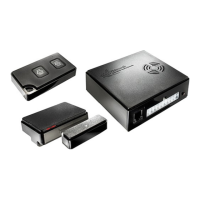
Do you have a question about the Thitronik WiPro III safe.lock and is the answer not in the manual?
States the manual's intended audience and liability.
Verifies vehicle compatibility and existing systems.
Lists tools and accessories needed for installation.
Setting the DIP switch for the Ducato CAN bus interface.
Guide to removing dashboard panels.
Instructions for removing the on-board computer unit.
Attaching the WiPro unit to the on-board computer.
Connecting the earth wire to the vehicle chassis.
Connecting to CAN bus and flashing warning lights.
Wiring for 12V power and ignition signals.
Connecting for central locking and CAN bus control.
Diagnosing common central locking system errors.
Wiring the WiPro to the vehicle horn.
Mounting and connecting the status indicator LED.
Pairing wireless accessories with the WiPro unit.
Installing additional wireless components.
Comprehensive testing of system functionality.
Diagnosing and resolving system malfunctions.
Introduction to mounting wireless magnetic contacts.
Correct positioning of transmitter housing variants.
Critical alignment of circuit board and LED for functionality.
Options for upright mounting on frames or panes.
Methods for attaching magnetic contacts (adhesive/screw).
Overview of circuit board layout in the transmitter housing.
Correct placement of the magnet relative to the reed switch.
 General
| Category | Automobile Accessories |
|---|---|
| Type | Alarm System |
| Model | WiPro III safe.lock |
| Brand | Thitronik |
| Power Supply | 12V DC |
| Operating Temperature | -20°C to +60°C |
| Feature | Wireless |
| Locking Mechanism | Electronic |
| Communication | Wireless |

 To Next Page