WIRELESS WEATHER STATION
EN
10
C - CONFIGURATION
the ALERT button once. The LED
disappears
- To set the top and bottom value for alerts,
press and hold the ALERT button for 3 seconds.
The Hi LED ashes. Using the UP and
DOWN button, set the max temperature that will
trigger the alert. Conrm this setting by pressing
once on the ALERT button. The Lo LED then
ashes. Using the UP and DOWN buttons, you
can set the low temperature that will trigger the
temperature alert.
To nish, press once more on the ALERT button.
BACKLIGHT SETTING
- If operated from a battery supply, the backlight
is switched off by default. You can switch it on
by pressing the SNOOZE/LIGHT button. The
weather station will be backlit for 5 seconds.
- If operated from the mains supply, the backlight
is switched on by default, without a time limit.
You can adjust the brightness or switch it off
completely by pressing briey and repeatedly on
the HPA/INHG button.
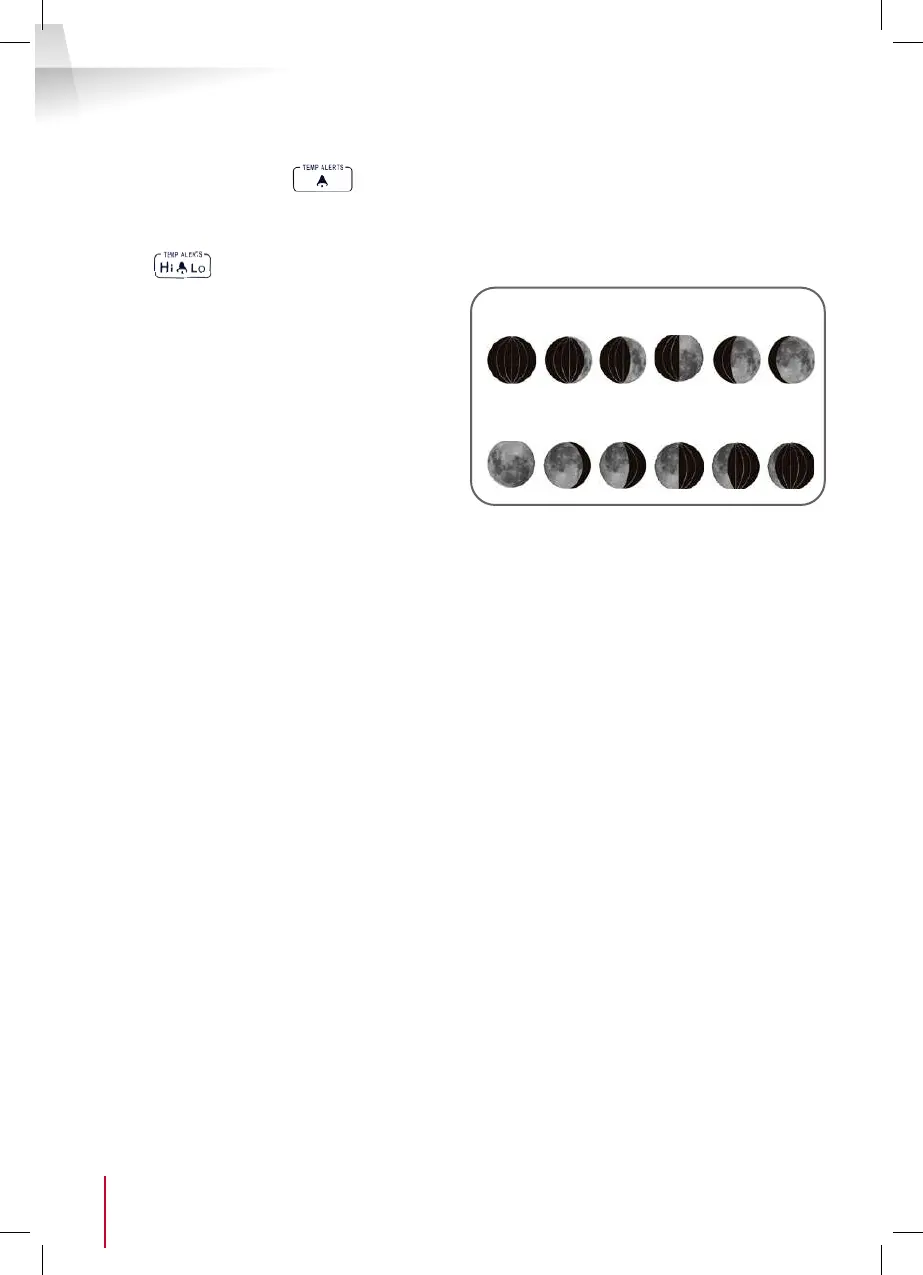
MOON PHASE
The moon phase is calculated and displayed
automatically according to the date and year. It
is therefore essential that the date and year are
correct. (See DATE and TIME SETTING)
New
moon
Full
moon
First
crescent
Gibbous
moon
First
quarter
Last
quarter
Gibbous
moon
Last
crescent


 To Next Page