- EN 4 -
Description of Parts
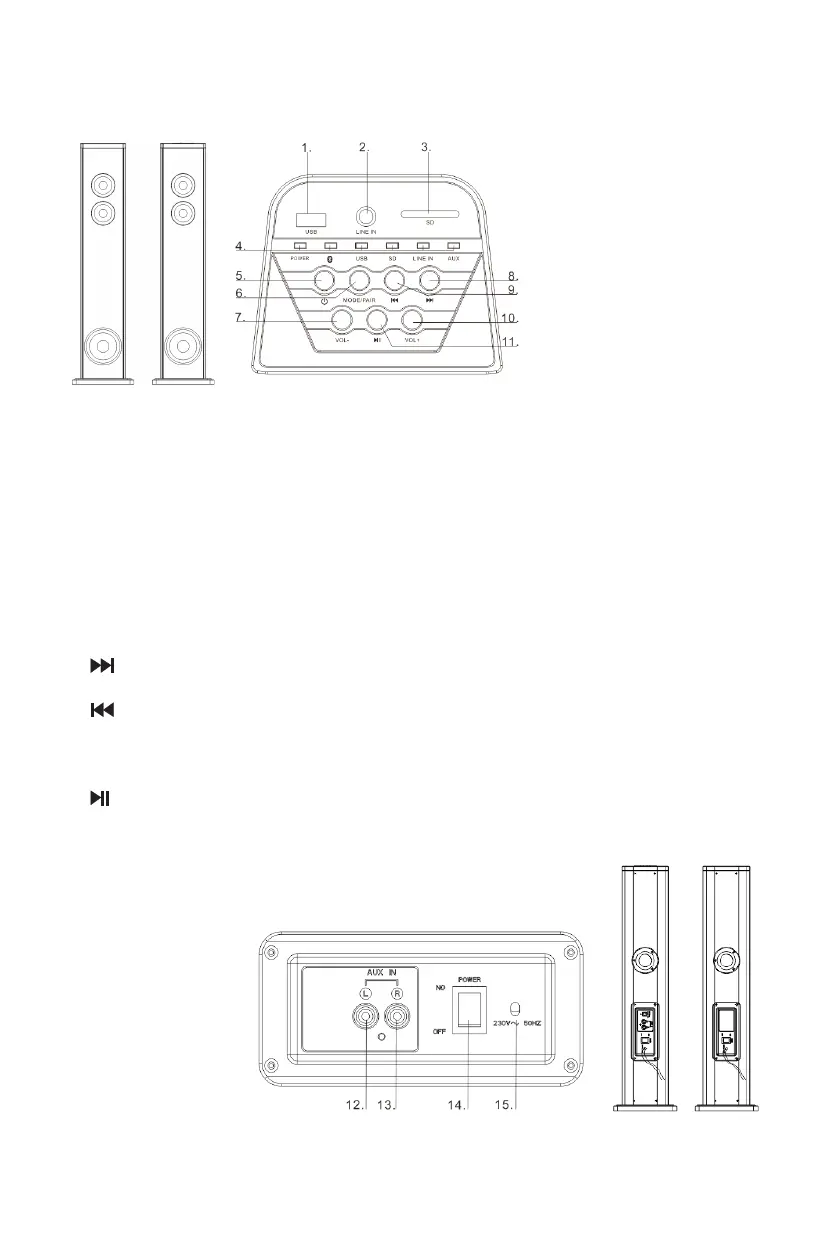
Overview of the main unit
1. USB socket
2. Line in
Connect an external audio device 3.5mm jack
3. SD
4. LED indicator
5. Standby
Turn on the unit, switch to Standby mode
6. MODE/PAIR
Select a MODE: Bluetooth, USB, SD, or AUDIO IN
Pair with the 2nd speaker
7. VOL -
Adjust the Volume-
8.
In USB/SD/BT mode, skip to next track
9.
In USB/SD/BT mode, skip to previous track
10. VOL +
Adjust the Volume+
11.
Start or pause play
12. AUX IN-L
13. AUX IN-R
14. POWER SWITCH
15. Power cord



 To Next Page