EN
EN
9
10
Playing mp3/ WMA files with SmartTrax
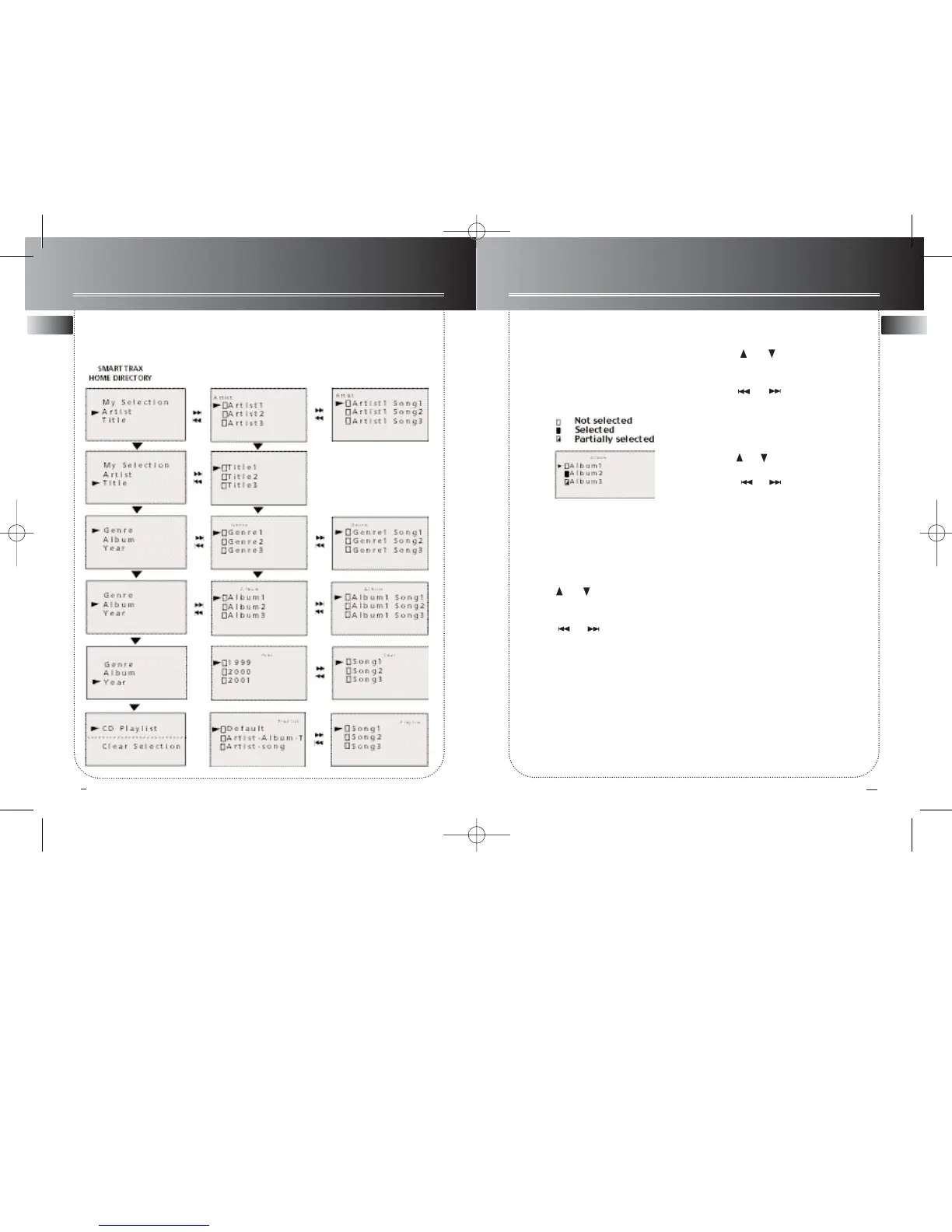
Navigation chart (SmartTrax mode)
Playing mp3/ WMA files with SmartTrax
My Selection
Selected categories and tracks can be
bookmarked and placed into My
Selection. The selected categories / tracks
will be marked as below:
1. Enter SmartTrax mode if the unit is cur-
rently in folder mode.
NOTE: The unit must be in SmartTrax
mode in order to select tracks to be
placed in My Selection.
2. Press or to select the category
to enter.
3. Press or to enter / exit cate-
gory.
4. Once you have entered one of the
home directory categories, press ENTER
to select the category or individual title
to place into My Selection.
View My Selection
1. Press or to scroll the home
directory to select the My Selection.
2. Press or to enter category.
Clear My Selection
1. Press or to scroll the home direc-
tory to select the Clear Selection.
2. Press or to enter category.
3. Follow the instructions to clear My
Selection.



 To Next Page