3
General Controls
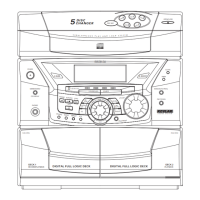
Main Unit
• OPEN/ CLOSE - Opens or closes
disc tray.
• DISC 1 - 5 - Selects disc tray 1, 2,
3, 4 and 5 directly.
• DISC SKIP - Press repeatedly to
change to desired disc tray.
• POWER - Turns power on/ off.
(POWER/ ECO for Thomson model
- Press and hold during standby
(off) mode to go to ECO mode.)
• DEMO/ DIMMER/ CD DISPLAY
- Turns feature demonstration on/
off. Adjusts brightness of display.
Displays disc details during CD
playback.
• PHONES - Connects head-
phones.
• CLOCK - Sets and displays clock
time.
• TIMER - Sets and turns on/off
the timer.
• BAND/ AUTO PROG - Selects
radio band and enters auto tuner
programming.
• FM ST/ SCAN - Starts auto FM
station searching. Selects between
FM mono and stereo sound.
• X-SURROUND - Turns surrond
sound on/ off.
• SOURCE - Selects among tape,
CD, tuner and auxillary mode.
PLAY/ PAUSE - starts
and pauses CD/ tape
playback
STOP - Stops CD or tape
playback.
REWIND/ FFWD - Starts
backward or forward
search of CD/ tape.
• EQ BAND - Selects base, mid
and treble range
• CUSTOM EQ - Selects self-creat-
ed equalizer curve.
• EQ - Selects among preset equal-
izer curves.
• RECORD - Starts recording.
• DECK 1/2 - Selects between tape
deck 1 or 2.
• B. BOOST - Turns
on/ off bass boost.
• SET- Sets tuner
preset or CD pro-
gram.
• HELP MODE -
Turns help mode
on/ off to display
useful information
about system keys
and features.
• VOLUME -
increases or
decreases volume.
• SHUFFLE (MIX
for Thomson
model) - Enters ran-
dom playback
mode.
• INTRO (CT/ INTRO for Thomson
model) - turns on/ off introductory
mode to play the first 10 seconds
of each track on a disc.
• REPEAT (RDS/ REPEAT for
Thomson model) - Selects among
repeat modes.
• ATS - Sets up an automatic track
skip program.
• MULTI JOG STATION - Increases
or decreases numerical values for
clock & timer setting, tuner preset
station selection, track selection
etc.
Remote Control
You can control most of the func-
tion keys as those are present on
the main until through the
remote control. However, the fol-
lowing keys are present on the
remote control only:
• AUX/ TUNER/ CD/ TAPE - selects
respective modes directly.
• EQ PRESET - selects among pre-
set equalizer curve.
• VOL -/ VOL + - adjusts volume.
• MUTE - mutes sound.
• PAUSE - pauses CD/ tape play-
back and recording
• TRACK REV/ TRACK FWD - skips
CD tracks or winds tape forward
or backward. Press and hold to
start quick search through CD.
• SLEEP - enters SLEEP mode.
• PRESET - selects tuner preset
stations.


 To Next Page









