Setting the Fridge Compartment Temperature
Repeatedly touch to select the desired temperature.
x The corresponding temperature indicator light will i
lluminate.
x There are 5 temperature settings for choice: 2°C, 3°C, 4°C, 6°C and 8°C.
Setting the Freezer Compartment Temperature
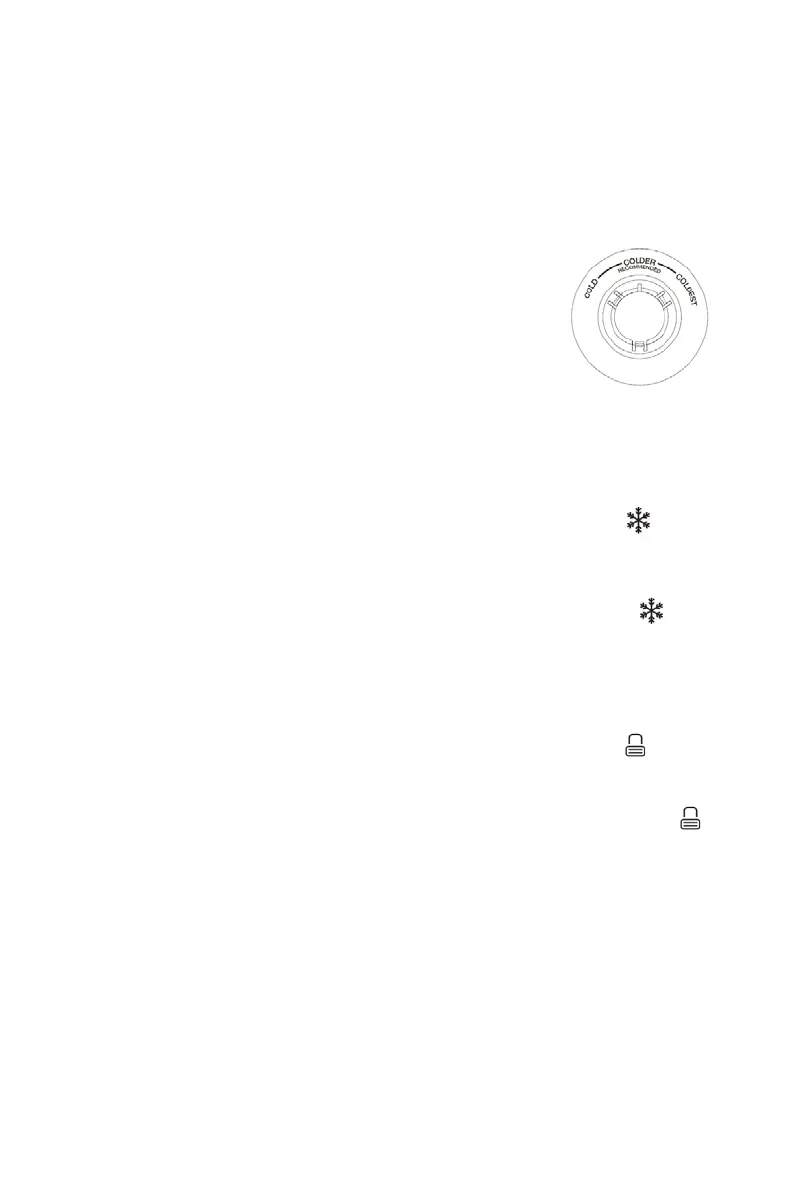
There is a temperature control knob inside the freezer compartment.
You can set the freezer compartment temperature by turning this control
knob.
There are 3 settings: COLD, COLDER and COLDEST.
It is recommended to turn this control knob to the COLDER position for
normal use.
Power cool function
You can use this function to increase the cooling capacity of the fridge compartment when placing larger
amounts of food within it.
x To activate this function, in unlock state press and the indicator light will
illuminate
.
x This function will be automatically deactivated after about 3 hours and the fridge compartment will
return to the previous selected temperatur
e setting.
x To deactivate this function, in unlock state press and the indicator light will go
out.
Lock/Unlock
x To lock buttons, touch and hold for 3 seconds. The lock indicator light will
illuminate. In the lock state, all buttons will be disabled.
x To unlock buttons, touch and hold again for 3 seconds. The lock indicator light will
go out.
NOTE: In the unlock state, if there is no operation of any button for about 1
minute, the system will automatically enter the lock state.
MOVING YOUR APPLIANCE
If the appliance is turned off for any reason, wait for 10 minutes before turning it back on. This will allow
the refrigeration system pressures to equalize before restarting.
x Turn off the appliance and unplug it from the mains socket. Remove all food. Also remove all mobile
parts (shelves, accessories, etc.) or fix them into the appliance to avoid any shock.
x Relocate and install. If the appliance has been left on its side for any length of time, leave it standing


 To Next Page