EN67EN67
SP
6
O
F
F
D
S
C
P
L
A
Y
P
L
A
Y
1
S
1
S
A
R
O
2
Y
V
E
U
B
N
/
V
T
N
I
C
S
I
U
D
T
H
–
D
R
R
V
E
N
M
M
O
C
I
O
O
O
O
D
D
D
P
E
M
E
E
Y
O
EN
O
O
U
F
N
F
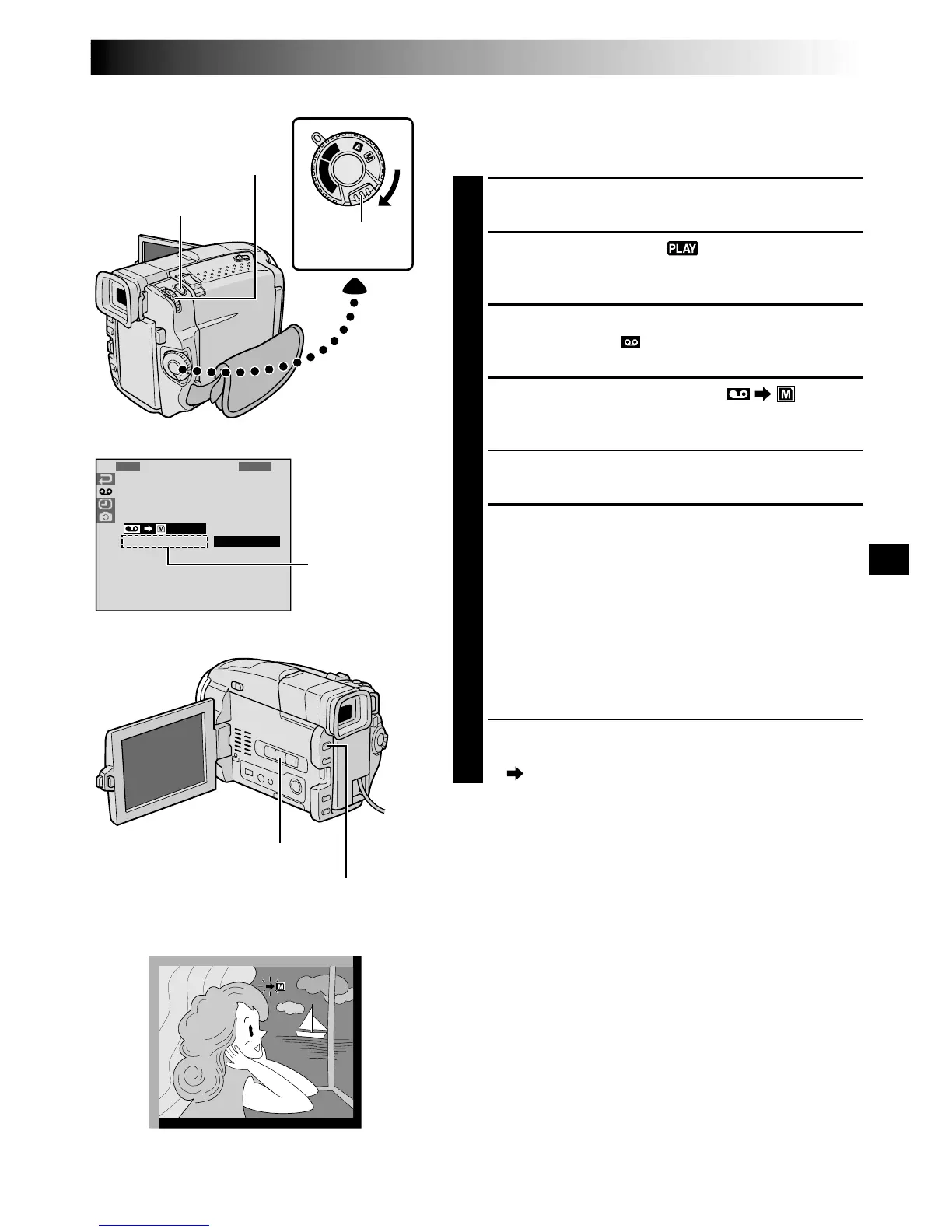
VMD20 only
Display
Power Switch
SNAPSHOT Button
Lock Button
Dubbing Images Recorded On A Tape To A
MultiMediaCard
Images can be dubbed from a tape to a MultiMediaCard.
1
Load a MultiMediaCard ( pg. 12) and cassette
( pg. 10).
2
Set the Power Switch to “ ” while pressing down
the Lock Button. Open the LCD monitor fully or pull
out the viewfinder fully.
3
Press MENU/BRIGHT. The Menu Screen appears.
Rotate it to select “ ” and press it. “VIDEO MENU”
appears.
4
Rotate MENU/BRIGHT to select “ COPY”
and press it. The Sub Menu appears. Rotate it to
select “ON” and press it. Selection is complete.
5
Rotate MENU/BRIGHT to select “
1
RETURN” and
press it twice. The normal playback screen resumes.
6
To select a video image to be dubbed, start playback
by pressing
4
/6. At the moment you find the image
you wish to dub, press it again to engage Still
Playback.
OR
If you want to dub a snapshot recorded on the tape to
the MultiMediaCard, press INDEX SCREEN to find the
snapshot. The tape fast-forwards and pauses at the
snapshot. Press it repeatedly until the desired
snapshots are found.
7
To start dubbing, press SNAPSHOT. The selected
image is stored in the MultiMediaCard.
•“ ” blinks during dubbing.
NOTES:
●
If SNAPSHOT is pressed in step 7 when a
MultiMediaCard is not loaded, the message “COPYING
FAILED” is displayed.
●
If an image recorded on the tape using the WIDE mode
(
pg. 32) is dubbed to a MultiMediaCard, the WIDE
mode identifying signal is not dubbed with it.
●
To use Playback Special Effects with a video image you
wish to dub, perform up to step 7 using the TC200M
remote control (provided) (
pg. 71).
●
Images are dubbed in VGA file size.
INDEX SCREEN Button
MENU/BRIGHT Wheel
Play/Pause Button (
4
/6)


 To Next Page