EasyManua.ls Logo

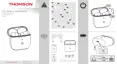
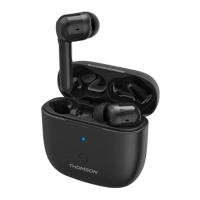
THOMSON WEAR7811 - User Manual

THOMSON WEAR7811
172 pages
Print Icon
To Next Page IconTo Next Page
Loading...
G Operating Instructions F Mode d‘emploi D Bedienungsanleitung E Instrucciones de uso
I Istruzioni per l‘uso O Manual de instruções R Руководство по эксплуатации
N Gebruiksaanwijzing P Instrukcja obsług H Használati útmutató i J Οδηγίες χρήσης
C Návod k použití Q Návod na použitie T Kullanma kılavuzu
S Bruksanvisning L Käyttöohje M Manual de utilizare
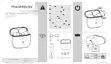
True Wireless Headphones
Écouteurs True Wireless
True Wireless Kopfhörer
WEAR
7811

Other manuals for THOMSON WEAR7811

Question and Answer IconNeed help?

Do you have a question about the THOMSON WEAR7811 and is the answer not in the manual?

Summary

Operating Instructions

Controls and Displays Overview

Overview of the product's physical controls and visual indicators.

Package Contents

Lists all items included in the product packaging.

Warning Symbols and Notes Explanation

Explains the meaning of symbols used for safety instructions and important notes.

Safety Instructions

Rechargeable Battery Safety

Safety precautions related to the product's rechargeable battery.

Magnet Safety Precautions

Warnings regarding magnetic fields and potential interference with medical devices.

High Volume Hearing Safety

Advice on preventing hearing damage from loud audio playback.

Switching On and Off

Powering On and Off Instructions

Instructions on how to turn the earphones and charging box on and off.

Charging the Device

Inserting Earphones and Connecting Charger

Guide on how to place earphones in the box and connect the charging cable.

Charging Procedure and Status Indicators

Details the charging process for the box and earphones, including LED indicators.

Battery Capacity Indicators

Explains how to interpret LED indicators for battery levels.

Bluetooth Pairing

Checking Pairing Status and Announcements

How to check the earphone's LED status and announcements during pairing.

Device Search and Connection Process

Steps to find and connect the earphones to a Bluetooth device.

Resetting the Earphones to Factory Settings

Instructions to restore the earphones to factory settings.

Product Controls

Voice Assistant Function Activation

How to activate Siri or Google Assistant using the earphone controls.

Hands-Free Call Functions

Using earphones for making, accepting, and ending phone calls.

Audio Playback Control

Managing music playback, including play, pause, next, and previous tracks.

Volume Adjustment Methods

How to control the audio volume via voice assistant or smartphone.

Active Noise Cancelling (ANC) Usage

How to activate and deactivate the noise cancellation feature.

Gaming Mode Activation

Enabling and disabling the special gaming mode for enhanced audio.

Technical Data

Care, Warranty, and Compliance

Care and Maintenance Guidelines

Instructions for cleaning and maintaining the product.

Warranty Disclaimer Information

Details limitations of liability and warranty conditions.

Service and Support Contact

Information on how to get help and support for the product.

Recycling and Environmental Information

Guidelines for responsible disposal and recycling of the product.

Declaration of Conformity

Statement confirming compliance with relevant EU directives.
Summary

Operating Instructions

Controls and Displays Overview

Overview of the product's physical controls and visual indicators.

Package Contents

Lists all items included in the product packaging.

Warning Symbols and Notes Explanation

Explains the meaning of symbols used for safety instructions and important notes.

Safety Instructions

Rechargeable Battery Safety

Safety precautions related to the product's rechargeable battery.

Magnet Safety Precautions

Warnings regarding magnetic fields and potential interference with medical devices.

High Volume Hearing Safety

Advice on preventing hearing damage from loud audio playback.

Switching On and Off

Powering On and Off Instructions

Instructions on how to turn the earphones and charging box on and off.

Charging the Device

Inserting Earphones and Connecting Charger

Guide on how to place earphones in the box and connect the charging cable.

Charging Procedure and Status Indicators

Details the charging process for the box and earphones, including LED indicators.

Battery Capacity Indicators

Explains how to interpret LED indicators for battery levels.

Bluetooth Pairing

Checking Pairing Status and Announcements

How to check the earphone's LED status and announcements during pairing.

Device Search and Connection Process

Steps to find and connect the earphones to a Bluetooth device.

Resetting the Earphones to Factory Settings

Instructions to restore the earphones to factory settings.

Product Controls

Voice Assistant Function Activation

How to activate Siri or Google Assistant using the earphone controls.

Hands-Free Call Functions

Using earphones for making, accepting, and ending phone calls.

Audio Playback Control

Managing music playback, including play, pause, next, and previous tracks.

Volume Adjustment Methods

How to control the audio volume via voice assistant or smartphone.

Active Noise Cancelling (ANC) Usage

How to activate and deactivate the noise cancellation feature.

Gaming Mode Activation

Enabling and disabling the special gaming mode for enhanced audio.

Technical Data

Care, Warranty, and Compliance

Care and Maintenance Guidelines

Instructions for cleaning and maintaining the product.

Warranty Disclaimer Information

Details limitations of liability and warranty conditions.

Service and Support Contact

Information on how to get help and support for the product.

Recycling and Environmental Information

Guidelines for responsible disposal and recycling of the product.

Declaration of Conformity

Statement confirming compliance with relevant EU directives.

THOMSON WEAR7811 Specifications

General IconGeneral
BrandTHOMSON
ModelWEAR7811
CategoryHeadphone
LanguageEnglish

Related product manuals