EasyManua.ls Logo

THOMSON WS702 - Optical Mode

THOMSON WS702
Print Icon
To Next Page IconTo Next Page
To Previous Page IconTo Previous Page
Loading...
- EN 15 -
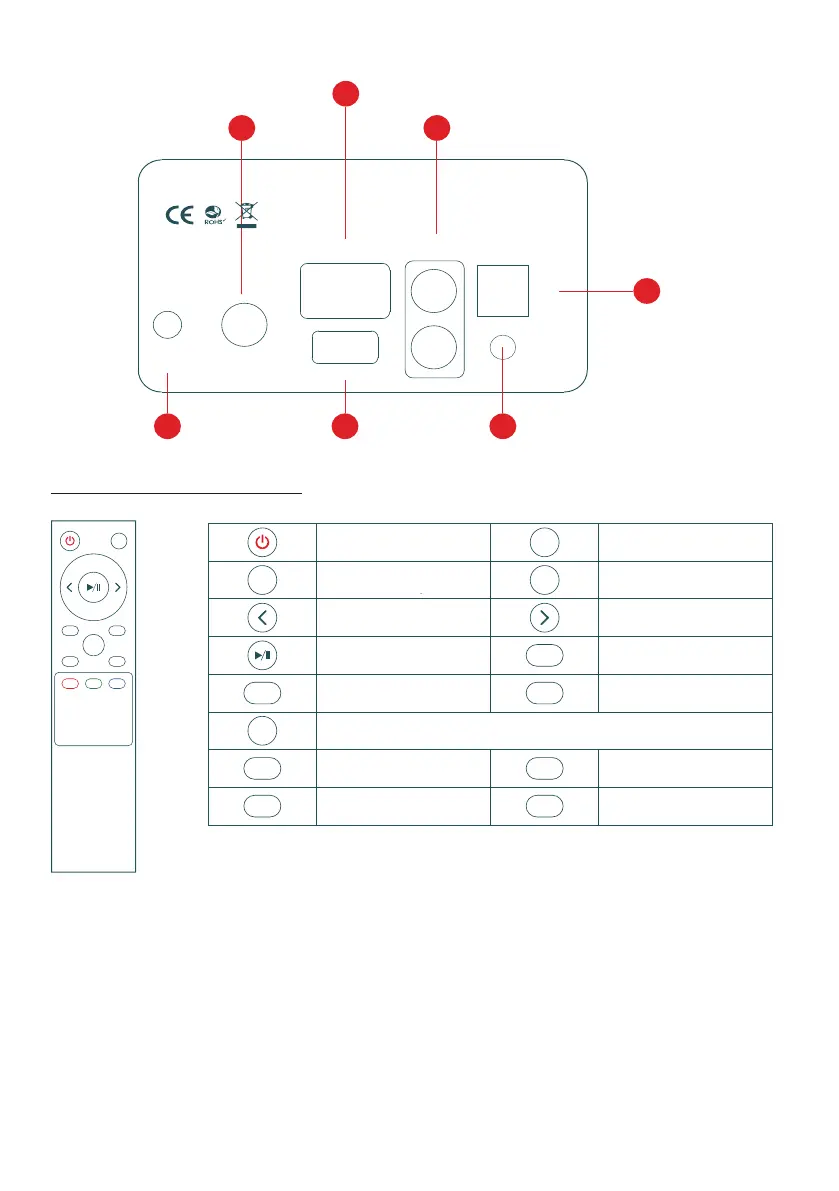
SUB OUT
TV Audio LINE IN
USB
DC IN
19-21v
L
R
OPT
AUX OUT
06 09 12
11
08
1007
Power Consumption: 50W
Power port
Connect a subwoofer
TV Audio input port
USB input port
Line in input port
Optical input port
AUX OUT output port
Discover your remote control
USB
MOVIE MUSIC
VOICE
OPT TV
LINE
MUTE
VOL+
VOL-
BT
Power button
Volume up
Previous track
Play/pause
TV mode USB mode
Movie mode
Voice mode
Music mode
Line in mode
Bluetooth mode
Optical mode
Next track
Volume down
Mute/Unmute
MUTE
VOL+
VOL-
OPT
BT
TV USB
MOVIE
VOICE
MUSIC
LINE
Line in input
1. Press the mode/volume button to select a Line in input. The indicator light turns blue.
2. Use the appropriate RCA cable to connect an audio source to the speakers.
3. Play music from your connected device and adju󰘵 the volume on your device or by turning
the "Mode" button.
Connect a subwoofer
TV Audio input port
Line in input port
Optical input port
AUX OUT output port
USB input port
Power port
Power button
Increase volume
Previous track
Play/Pause
TV mode
Bluetooth Mode
"Line in" mode
Music mode
Enable/Disable sound
Reduce the volume
Next track
Optical mode
USB mode
Movie mode
Voice mode

Related product manuals