Need help?
Do you have a question about the THOR PW Series and is the answer not in the manual?
Essential safety precautions to prevent electric shock, fire, and injury during inverter operation.
Explains DANGER, WARNING, and CAUTION symbols and their associated risks.
Specific warnings for electrical shock, fire hazards, and injury prevention.
Warnings against positive ground systems, high wattage appliances, medical devices, and unauthorized modifications.
Welcome message and description of the inverter's capabilities and purpose.
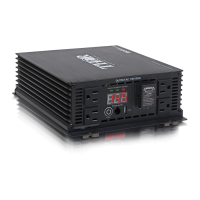
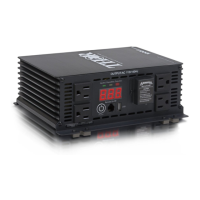
Identifies and describes front panel elements: GFCI outlets, display, buttons, and ports.
Details the DC power input terminals, grounding post, and cooling fans on the rear.
Explains conversion process, output waveform, and how to manage appliance power consumption.
Cautions regarding charging devices, monitoring heat, and using separate chargers.
Covers DC input voltage, connection rules, battery sizing, and built-in protective features.
Illustrates the DC power connection setup, including fuse holder and wiring.
Steps to calculate the necessary battery capacity based on appliance wattage and usage time.
Explains low voltage, over voltage, overload, and over temperature shutdown protections.
Recommendations for placement, temperature, ventilation, and safe locations.
Specific installation advice for marine environments, focusing on moisture and corrosion.
Steps for a temporary connection to verify inverter functionality.
Lists necessary parts and initial setup actions for a fixed installation.
Detailed steps for wiring DC connections, mounting the inverter, and securing components.
Guidance on choosing appropriate cables to prevent power loss and ensure secure connections.
Procedure for connecting AC appliances to the inverter's output terminals.
How to connect and use appliances with the inverter's GFCI protected AC outlets.
Instructions for using the USB port to charge devices, noting data communication is not supported.
Information on connecting and operating the inverter using an optional remote control.
Solutions for audio buzzing and television interference when using the inverter.
Explanation of display codes (E01-E05) and their corresponding error conditions and solutions.
Information on automatic resetting after over-voltage or thermal shutdown.
Guidelines for ideal storage temperature, environment, and avoiding heat sources.
Routine checks and cleaning procedures to ensure optimal inverter performance.
Contact information for accessories, warnings on using unapproved items, and service locations.
Details the warranty coverage, limitations, and exclusions for the inverter.
Information on returning defective products for replacement or repair within the warranty period.
Instructions for activating the product warranty by mailing registration information.
Table detailing specifications for different THPW models, including output, voltage, current, and dimensions.
 General
| Rated Power | 1000W, 1500W, 2000W, 3000W |
|---|---|
| Output Frequency | 50Hz / 60Hz (±3Hz) |
| Output Waveform | Modified Sinewave |
| Continuous Power | Same as Rated Power: 1000W, 1500W, 2000W, 3000W |
| Protection Features | Overload, Short Circuit, Over Voltage, Low Voltage, Over Temperature |
| Cooling | Fan |

 To Next Page