PTA522, PTA523 and PTA524 Automatic Silent Compressors Chapter 3: Operation
Rev A August 2021 Page 5
Chapter 3 Operation
3.1. Machine Set Up – Oil Fill
Install the compressor on a flat surface, in a dry, well ventilated room, where the temperature is not likely to rise above
35°C. If there is not enough air ventilation, install a suitably sized exhauster or fan.
Warning
The compressor is normally shipped empty of oil. Check the oil level through the oil sight glass. If oil is missing,
follow the oil-fill instructions given below.
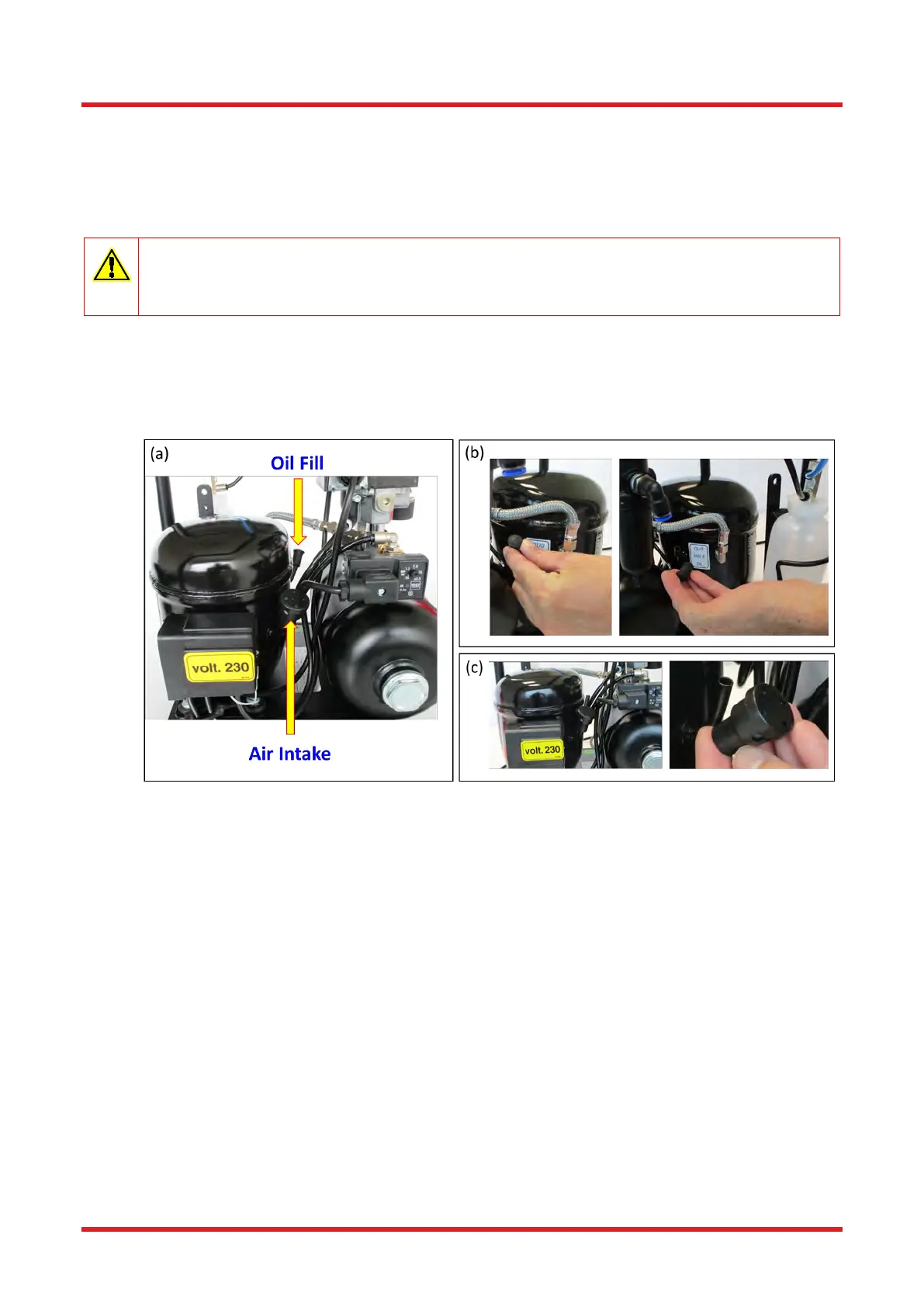
1. Identify the Air Intake and Oil Fill ports on the motor – see Figure 5a.
2. Remove the rubber transportation plug from the oil intake pipe (Figure 5b).
3. Remove the air intake filter (Figure 5c).
Figure 5 Identifying the Motor Ports and Removing the Fittings
4. Fit the spout supplied to the oil bottle, after snipping the end open at an angle (~45°). To avoid oil spillage when
filling, firmly fix the plastic tube supplied to the spout (Figure 6a).
5. Add the oil through the side pipe (Figure 6b) until reaching optimum level, as indicated on the oil level label and
visible through the oil level viewing glass (Figure 6c). From empty, a fill should normally require 400 mL of oil.
DO NOT overfill.
DO NOT pour oil down the air intake pipe.
DO NOT use oil other than that supplied or specified.
DO NOT overturn or excessively tilt the the compressor as this could cause oil to damage the compressor unit.
Oil can be obtained from www.thorlabs.com, part number PTA1006.
6. Once filled, replace the Air Intake filter and rubber cap for the Oil Fill port.
7. Keep any remaining oil left in the bottle for future topping up.


 To Next Page