2/8
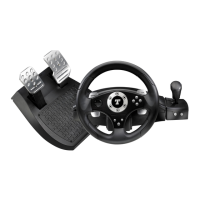
11 Analog pedal set
12 Axis 2: Analog brake pedal
13 Axis 3: Analog gas pedal
14 Table clamp
15 PC USB connector
16 Pedal cable
17 Main RJ45 connector for pedal set
18 Power adapter connector
19 Power adapter
INSTALLING THE WHEEL
Fixing the wheel in place
1. Place the wheel on a table or other flat surface.
2. Place the clamp screw in the table clamp (14) and then screw the clamping unit into the hole on the
underside of the wheel until firmly fixed in place. Do not turn the screw too tightly, as you risk
damaging the clamping unit and/or the table.
Connecting the pedal set
1. Connect the pedal connector (16) to RJ45 main connector (17) located behind the wheel.
2. Connect the power adapter (19) to the adapter connector (18) and plug the adapter into an electrical
outlet.










 To Next Page