
 Need help?
Do you have a question about the THX ONYX and is the answer not in the manual?
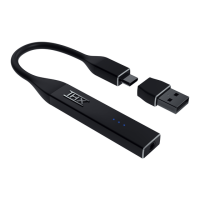
Connect the THX Onyx to a computer's USB port and plug in headphones.
Navigate to Control Panel > Hardware and Sound > Sound.
Select THX Onyx USB Amplifier and click Set Default if it's not listed.
Ensure THX Onyx has a green check mark indicating it is the Default Device.
With THX Onyx selected, click on the Properties button.
Set the Default Format to 24 bit, 192000 Hz and enable Exclusive Mode.
Adjust volume to 10%, click Test, and confirm the audio tone.
For headsets with mics, set THX Onyx as the Default Recording Device.
Change the microphone Default Format to 1-channel, 24-bit, 48000 Hz.
 General
| Frequency Response | 20Hz - 40kHz |
|---|---|
| DAC | ESS ES9281PRO |
| MQA Support | Yes |
| Connection | USB-C |
| Output | 3.5mm headphone jack |
| Type | Portable DAC/Amp |
| THX Certification | THX AAA |
| SNR | 120dB |
| Impedance Range | 22-600Ω |
| Battery Life | N/A (USB Powered) |

 To Next Page