EasyManua.ls Logo

TiCad LIBERTY - User Manual

TiCad LIBERTY
8 pages
Print Icon
To Next Page IconTo Next Page
Loading...
READ ME FIRST
TiCad
LIBERTY
V 17 01
Question and Answer IconNeed help?

Do you have a question about the TiCad LIBERTY and is the answer not in the manual?

Summary

Setting Up Your TiCad Liberty Trolley

Attaching the Wheels

Details on how to attach and detach the drive and front wheels, emphasizing proper locking and avoiding lubrication.

Connecting and Removing the Battery

Steps for connecting and disconnecting the battery, including handling precautions and proper connector use.

Adjusting and Using Your TiCad Trolley

Adjusting the Drawbar Height

Detailed steps for adjusting the drawbar height, including loosening, positioning, and tightening the handle for proper engagement.

Dual Button Control Operation

Explains how to start, stop, control speed, and use the parking brake with the dual button system.

Twist-Grip Control Operation

Details on starting, stopping, speed adjustment, and using the memory function with the twist-grip control.

Electromagnetic Parking Brake

How to release and apply the electromagnetic parking brake using the trolley's controls for both button and twist-grip systems.

Electronics, Battery, and Charger

Battery Handling and Charging

Guidelines for charging, handling, and storing the rechargeable lithium-ion battery, including safety warnings and proper charger use.

Warranty and Service Information

Contacting Service and Support

Instructions on how to contact TiCad for issues, arranging collection, and providing contact details for Germany.

Overview

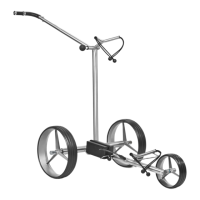
The TiCad Liberty is a high-quality, handmade electric golf trolley designed for ease of use and durability. It is manufactured in Altenstadt, Hessen, Germany.

Function Description

The TiCad Liberty is an electric golf trolley that assists golfers by carrying their golf bag around the course. It features a motor-driven system, allowing users to control its speed and movement. The trolley is designed to be easily set up and folded for transport and storage. It offers two control options: a dual-button control and a twist-grip control, catering to different user preferences. The trolley includes an electromagnetic parking brake that automatically engages when stopped, ensuring it remains in place on uneven terrain. A timer function allows the trolley to drive a preset distance (10 or 20 meters) before stopping, useful for sending it ahead. The motor can also act as a brake when moving downhill, providing resistance.

Important Technical Specifications

  • Model: TiCad Liberty
  • Weight of frame + wheels: 5.6 kg
  • Battery weight: 1.2 kg
  • Nominal battery voltage: 25.2 V
  • Battery capacity: 196 Wh
  • Motor capacity: 2x90 W
  • Dimensions when folded: 66 x 63 x 14 cm
  • Battery type: Rechargeable lithium-ion battery
  • Battery charge time: Approximately 8 hours
  • Battery life: Sufficient for an average of 27 holes with an additional trolley weight of approximately 16 kg.

Usage Features

Setting Up: The frame is designed for easy setup and folding. Users push the bottom bar down to its limit stop and the centre bar up to its limit stop.

Attaching Wheels: Drive wheels attach and detach with a quick-release fastener by pushing a sliding sleeve at the wheel hub. The front wheel attaches and detaches by pulling back a knurled sleeve. It's crucial to ensure wheels are locked to the drive pins and that no dirt enters the hubs.

Bag Holder: Bag holders are attached with expansion bolts. These bolts should not be turned in too far, maintaining a gap between the bolt and the thread start. The bag holder is inserted into the frame, aligned, and fixed by twisting.

Battery Connection: The battery is inserted into its holder and secured with a strap. It should be connected to the trolley before placing the golf bag. To disconnect, press the catch and pull the connector horizontally (avoid pulling the cable).

Attaching Golf Bag: Golf bags are fastened using round fasteners and straps. Users should avoid flicking fasteners to prevent injury. The drawbar should be adjusted only after the golf bag is attached to prevent tipping.

Adjusting the Drawbar: The drawbar height can be adjusted by turning a black handle counter-clockwise (3-4 times) to loosen it. Once freed, it can be moved to the desired position and then fastened by turning the handle in the opposite direction. The drawbar adjuster must be tightly fastened for watertightness.

Control Options:

  • Dual Button Control:
    • Start/Stop: Press both buttons (1+2) simultaneously. The control unit saves the last speed setting.
    • Speed Control: Top button (1) increases speed, bottom button (2) reduces speed.
    • Electromagnetic Parking Brake: Released by pressing "Slower" button (2), activated by pressing "Faster" button (1).
  • Twist-Grip Control:
    • Start/Stop and Speed Control: Twisting the handle forwards starts the trolley and increases speed. Twisting backwards reduces speed. Twisting fully back to the mechanical limit stop (zero) stops the trolley and activates the brake.
    • Memory Function: A single button (3) can also stop the trolley. Pressing it again resumes the last used speed.

Timer Function:

  • Base Setting: For dual button control, press both buttons. For twist-grip, press the single button while parked. Pressing until the LED lights up sets it to drive 10 meters. Pressing until the LED flashes sets it to drive 20 meters. The timer can be stopped by pressing both buttons/single button.
  • Changing Timer Function (Dual Button Control Only): Disconnect battery for 30 seconds. Press specific buttons (both buttons for standing, "Faster" for standing/driving, "Slower" for no timer) while reconnecting the battery. The LED will indicate the previous setting, then the new setting after 30 seconds.
  • Operating While Driving: Double-click "Slower" for 10 meters (LED lights up). Double-click "Faster" for 20 meters (LED flashes).

Motor Brake: When moving downhill, the trolley's drives can be used as a motor brake by setting the speed to a low setting to generate resistance.

Free-Wheel Function: Recommended when the battery is empty or for manual pushing/pulling. Push back the sliding sleeves on the wheels about 5 mm from the drive pin to engage.

Shaft Guard: A shaft guard is provided to protect drive shafts during transport and should always be used.

Umbrella Adapter:

  • Dual Button Control: Adapter is pre-fitted. Loosen the central screw with the supplied Allen key to adjust position and height. The larger hole on the adapter must point upwards, the smaller hole with the thread downwards. Tighten the screw after adjustment.
  • Twist-Grip Control: Adapter is at the end of the drawbar. The umbrella holder screws into the tapered adapter.

Maintenance Features

Cleaning: The frame is made of rust-proof material and sealed against rain. It can be cleaned with conventional household cleaning products, but not abrasive cleaners. Special cleaning oil from TiCad can restore the titanium's shine.

Lubrication: The wheel hubs and couplings must never be oiled or greased.

Water Exposure: Never clean the trolley with a high-pressure cleaner. If the trolley is briefly flooded with water, it should be sent to TiCad immediately.

Battery Care:

  • Fully charge before first use.
  • Lithium-ion batteries are hazardous goods and require careful handling. Do not expose to mechanical stress, manipulate, or open.
  • Always wrap and store the battery carefully.
  • Only charge with the supplied TiCad charger.
  • Charge for approximately 8 hours.
  • Connect the battery to the charger first, then the charger to the power supply.
  • Monitor battery and charger during charging.
  • For winter storage, store at approximately 50% charge in a cool, dry room without the charger connected.
  • Recharge after 3-6 months of storage.
  • Ideal storage temperature is 20°C.
  • Avoid high temperatures (> 40°C) and direct sunlight.
  • Protect the battery housing and cable from mechanical damage.
  • The battery housing is impermeable to spray water and must not be opened.
  • Do not clean with high-pressure cleaners.
  • If submerged in water or damaged, contact TiCad GmbH & Co. KG for safe battery transport.
  • Do not attempt to open or repair the battery yourself; this voids the warranty and can be unsafe.
  • Dispose of end-of-life batteries through a certified disposal company, not as domestic waste. TiCad offers customer service for battery disposal.

Charger Care:

  • Only use the supplied TiCad charger.
  • It is normal for the charger to heat up during charging.
  • Do not cover the charger or battery during charging.
  • Use the charger in a dry environment only.
  • Regularly check both devices.
  • Avoid using the charger in temperatures above 35°C and below 5°C.
  • Charger LED Status:
    • Green lit up: Battery fully charged
    • Green flashing: Battery is charging
    • Red: Error
  • The charger can also check battery charge: Green LED when connecting indicates a full charge.

Warranty:

  • Frame and Wheels: 5 years from purchase date.
  • Electronic Components: 2 years from purchase date.
  • Warranty does not cover damage from carelessness, rough handling, overloading, inappropriate operation, external force, water submersion, unauthorized actions, or damage to wheel coating and wear parts (tyres, leather handle, fastening straps).
  • Warranty applies only if operating instructions are followed, and the trolley is used with the TiCad battery pack and charger.
  • Battery performance loss due to ageing is not a manufacturing fault.
  • Technical changes do not entitle warranty holders to upgrades.

TiCad LIBERTY Specifications

General IconGeneral
BrandTiCad
ModelLIBERTY
CategoryGolf Trolleys
LanguageEnglish