8
USING THE MOBILE APPLICATION
You can use the “SHIFT Drone” application to preview a drone video in real time, and try various
ight modes for the drone to shoot from different perspectives.
Installation and Execution
1. Search “SHIFT Drone” in Google Play or App Store, and download the app to your smartphone.
2. Turn on the drone, connect to SHIFT-DRONE-XXXXXXXX from your smartphone’s Wi-Fi settings,
and run the application.
a
The initial password to connect to SHIFT-DRONE-XXXXXXXX is 1234567890. Please reset the password for security,
and remember it for future use.
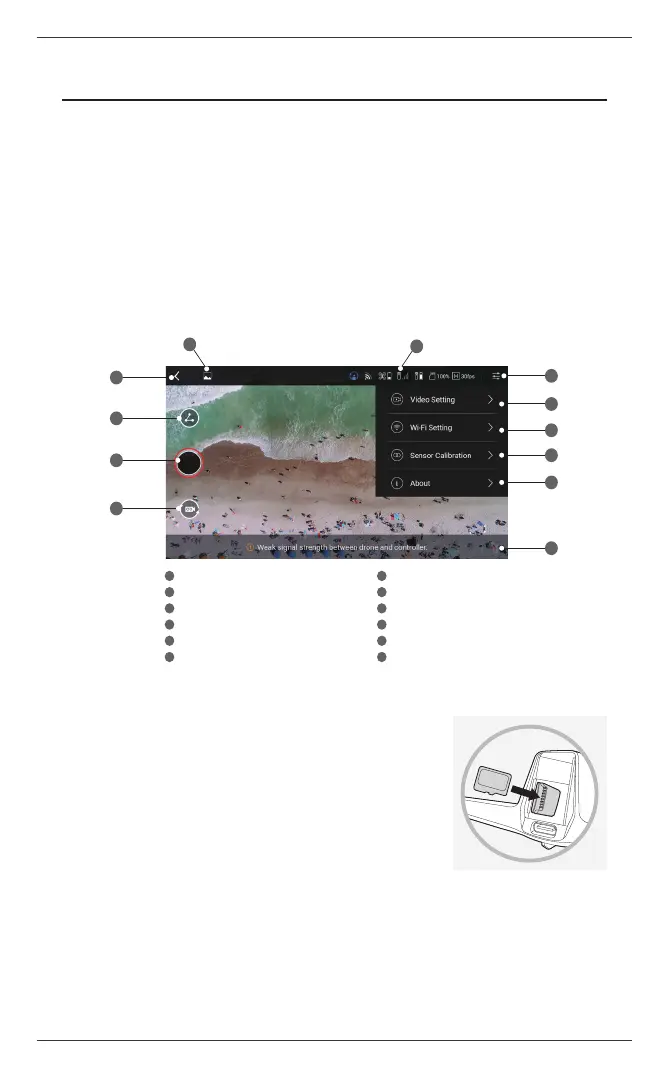
3. See below for details on the interface of the application.
a
The screenshots of the application interface provided in this User Manual are for illustration purposes only, and may not
be an exact representation of the application.
4. To take photos and videos using the SHIFT Drone application, a
micro SD card must be inserted in the aircraft. Remove the battery
and insert a micro SD card in the designated direction. Use the
provided micro SD card, or a micro SD card of video speed class 10
or UHS class 1 or higher with a capacity of no more than 32 GB.
a
Before removing the micro SD card, always check that the drone is powered off.
Go to the main screen
Go to the gallery
Drone/controller status information
Setting menu
Lezero Pilot mode
Video quality/frame settings
Wi-Fi setting
Sensor calibration
Version information
Take video/photo
Change video/photo mode
Notice
1
1 7
2 8
3 9
4 10
5 11
6 12
2
5
3
4
6
7
8
9
12
11
10
ⓒ 2019. this is engineering Inc. All Rights Reserved.


 To Next Page